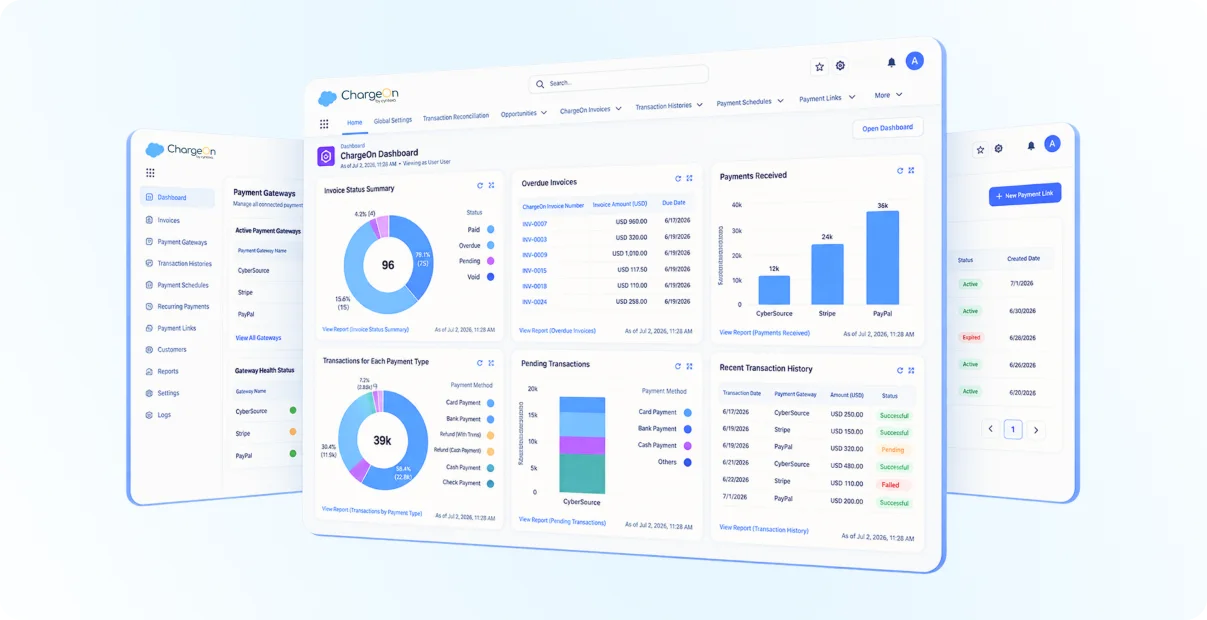
Get overall Salesforce payment management in one application
20+
Payment Gateways
100%
Salesforce Native
Secure. Seamless. Scalable.
Seamless payment processing in Salesforce

Everything You Need to Manage Payments in Salesforce
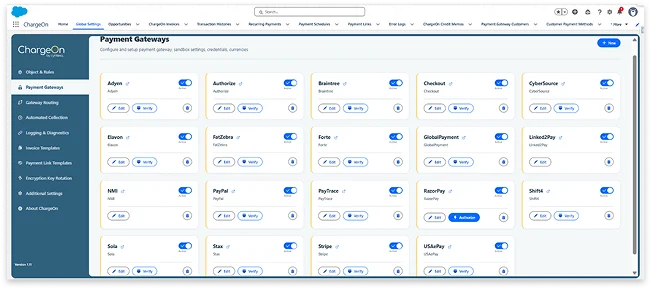
Connect to 20+ global payment gateways natively inside Salesforce. Eliminate vendor dependency on one, and run several gateways simultaneously. Switch to another gateway in case the primary one fails, so your payment processing never stops.
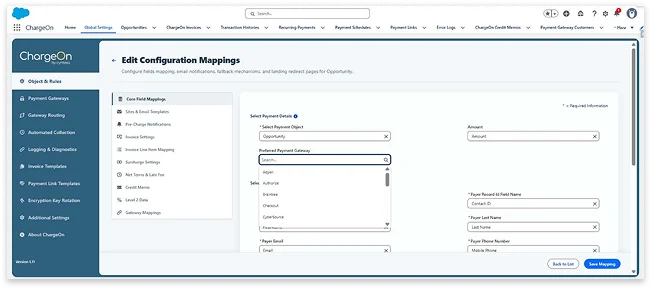
Set a preferred payment gateway for every object or configuration so it's auto-selected every time. Skip manual gateway selection and reduce errors during processing.
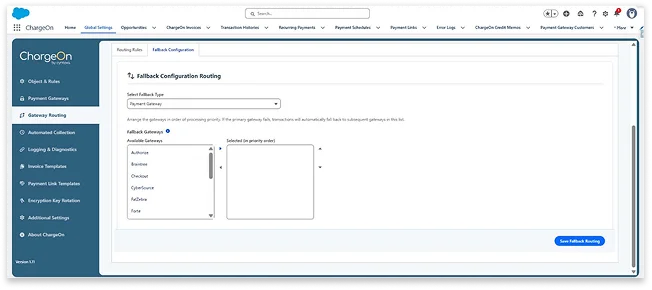
Automatically retry a failed transaction over a payment gateway through backup gateways that you have set up. You can configure up to 3 backup gateways in a priority order. Therefore, continuing your payment processing.
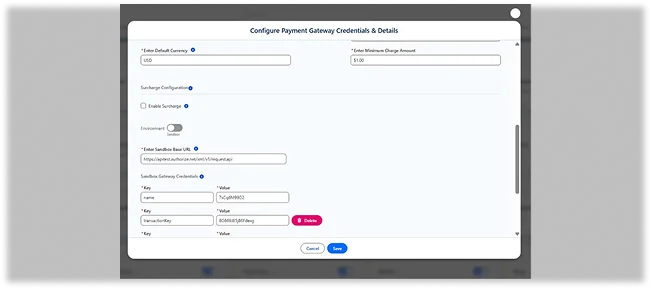
Switch payment gateway environment between Sandbox and Production using a toggle, without manual reconfiguration. The correct credentials and endpoints apply automatically. Ensure safe testing before go-live, and a smooth, error-free transition to production.
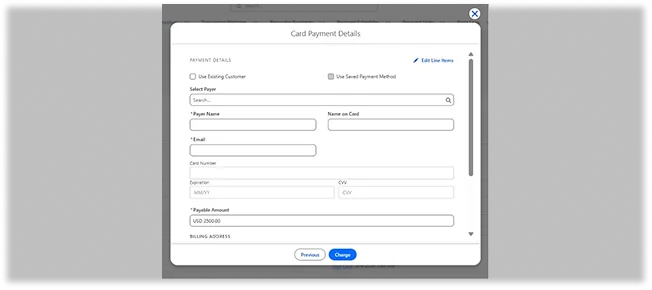
Process card payments through fields hosted directly by the gateway, keeping sensitive card data off your servers while supporting the full payment lifecycle. The card data is captured and processed through gateway-hosted fields embedded in the payment form, supporting the full lifecycle from payment, authorization, capture, refund, and void. This ensures maximum card security with minimum PCI compliance scope for your org.
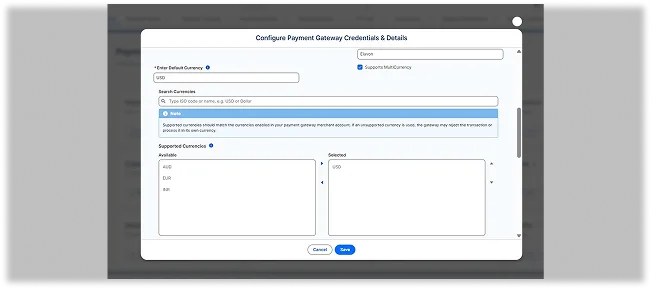
Process payments in multiple currencies, including zero, two, and three decimal formats, allowing you to sell globally without leaving Salesforce.
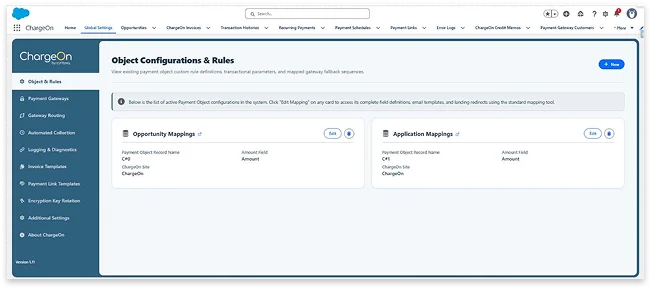
Connect ChargeOn to any Salesforce object, not just a fixed one. You can map it to any standard or custom Salesforce object, while the payments can then be initiated directly from those mapped records.
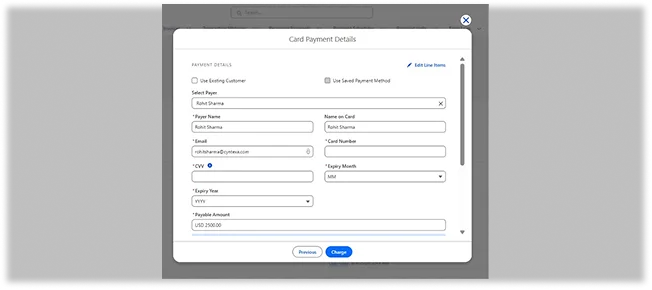
Pull customer details automatically from mapped Salesforce records. When a payment is initiated from a mapped record (e.g., a Contact), ChargeOn pulls existing customer details automatically into the payment form. This cuts down manual entry and reduces the chance of data-entry errors.
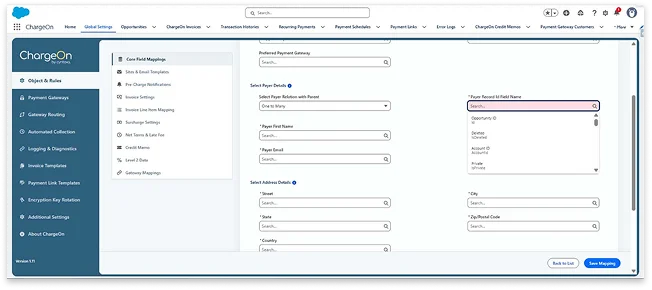
Link a single payer to multiple payment objects, standard or custom, for one centralized payment history without worrying about the transaction count. You get a complete, centralized view of a customer's payments.
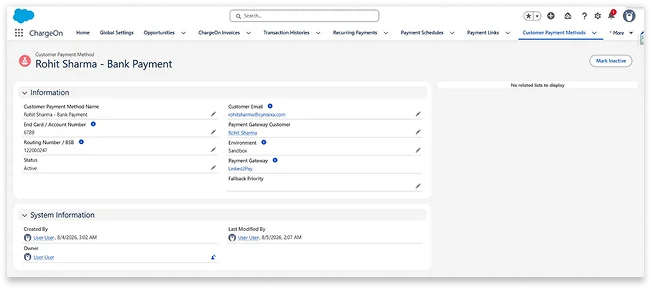
Manage the lifecycle of the stored payment methods with Active, Inactive, Expired, and Deleted statuses, keeping only valid methods available for processing. Each payment method carries a status: Active, Inactive, Expired, or Deleted. Only Active methods can be processed, and Expired status is set automatically by the system, not manually. Therefore, keep your stored payment methods valid and reliable, with no methods causing failure.
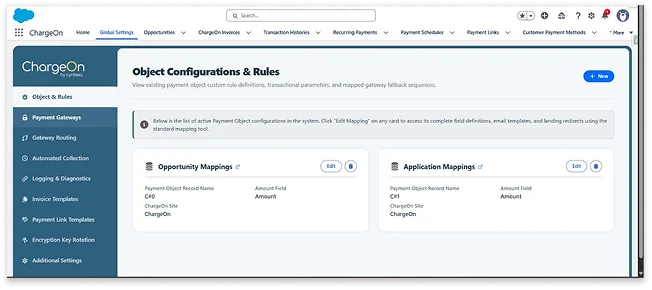
Get a single, centralized configuration hub. Manage business rules, object mappings, email templates, gateway priority, reCAPTCHA settings, and log/diagnostic monitoring from one place. The entire ChargeOn setup is controlled from one location instead of multiple places.
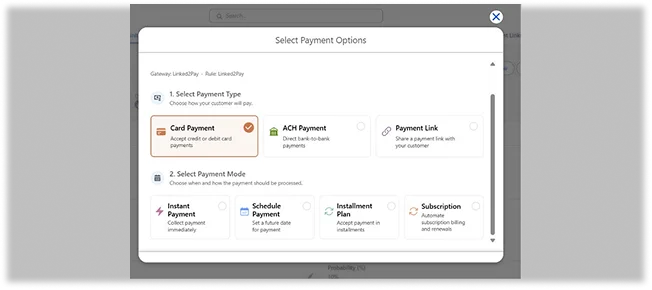
Accept cards, Bank/ACH/E-check, Payment Link payments, plus offline Cash, Check, and Wire. Process them as Instant, Scheduled, or Recurring payments. Get every payment scenario your business needs in one place.
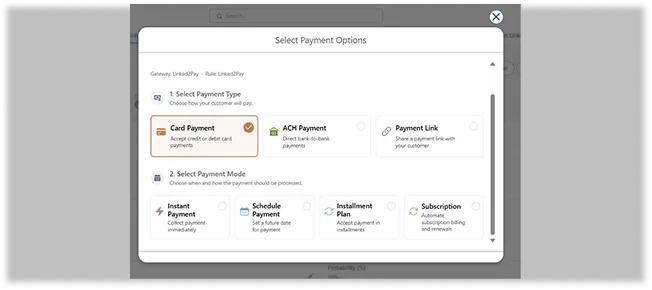
Charge a customer immediately and one-time in seconds via Card, Bank, or Payment Link through a secure form that opens right inside the Salesforce record you're working on.
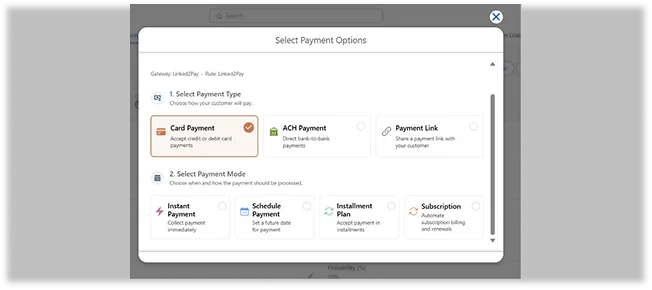
Set a future payment date once, and ChargeOn automatically processes the charge on that date. The date can be changed anytime before the charge runs. Set multiple schedules before time so you do not have to be on the system always to charge.
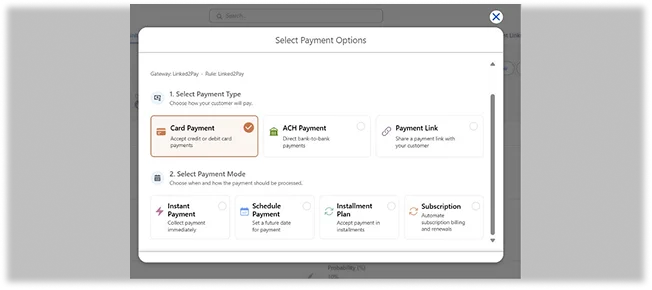
Send a secure payment link via email to your customers, allowing them to make payments on a Salesforce-hosted page. ChargeOn generates a secure link, plus an auto-generated QR code, and emails it to the customer, who pays on a Salesforce-hosted page. These transactions are recorded automatically, giving you a transaction record for full audit visibility.
Initiate new payments for a customer even while a recurring payment is already active. Business users can start additional Instant, Scheduled, or one-off payments for a customer without disrupting or pausing their existing recurring plan. Every transaction is tracked separately and accurately. This helps you handle complex billing without breaking what is already running.
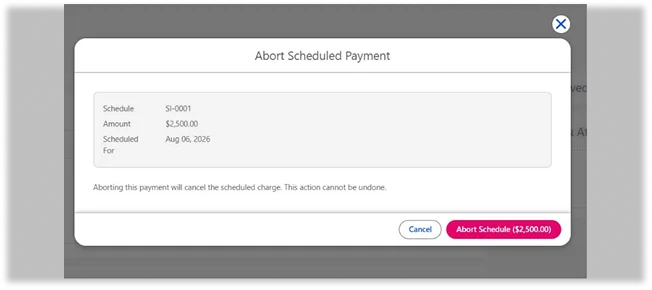
Cancel a Scheduled or Recurring payment before it runs using the Abort button. The status updates to 'Aborted' instantly with a log entry. This gives you full control to stop a charge anytime, before it takes place.
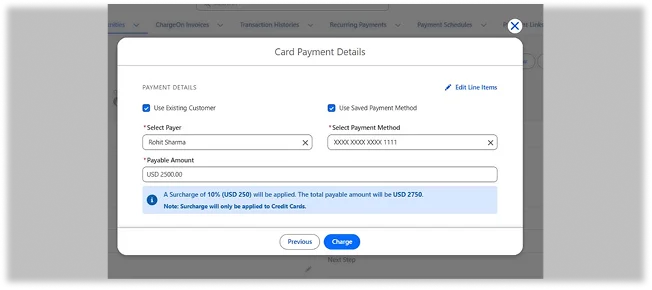
These are two checkboxes that pull in existing customer or payment information automatically from the data in Salesforce, offering three processing paths instead of a manual lookup. No re-entering information that's already on file. One checkbox, everything loaded.
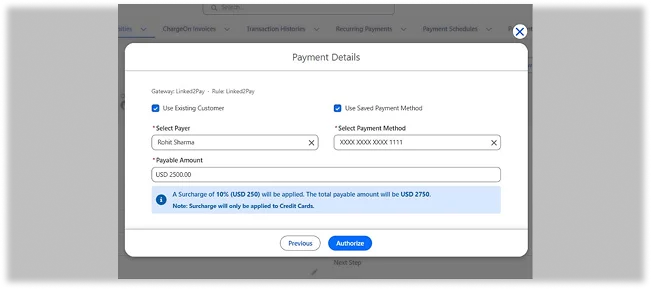
Reserve an amount on a card without charging it, then capture the payment later. The amount is placed on hold at the gateway; the business later chooses to Capture (complete the charge) or Void (release the hold).
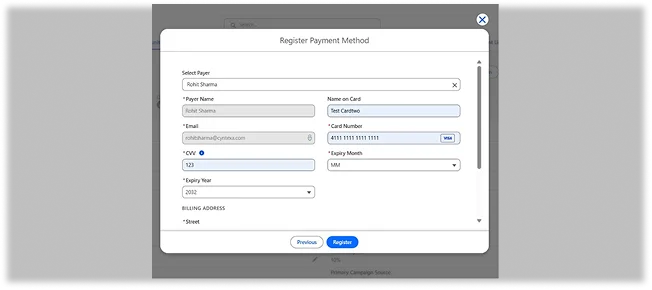
Securely capture and store a payer's card details at the gateway level for instant reuse later. The card information is collected and tokenized during the registration process, without any transaction occurring at that time. In cases of instant payments, you can reuse the saved card details whenever necessary. Once the card is saved, you can charge it at any time afterward.
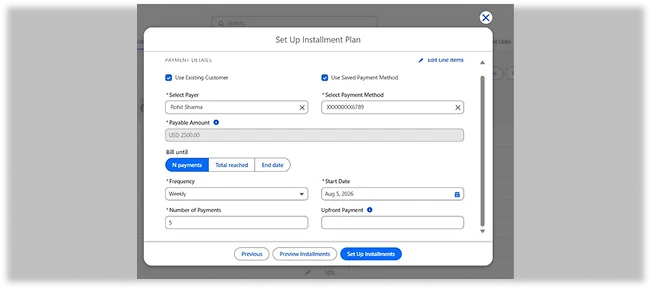
Collect an upfront payment when setting up a recurring plan, with the remaining balance billed according to the recurring schedule. This ensures a secure commitment at the start and reduces the risk of default later in the plan from the customer's side.
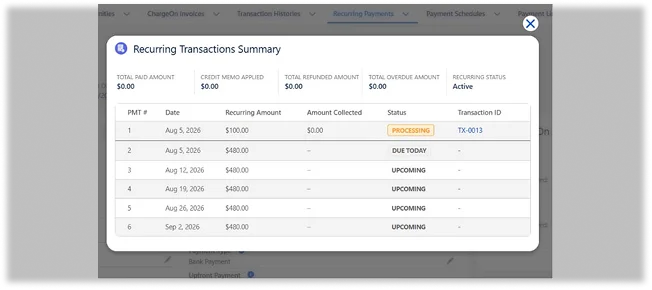
Automatically charge customers at set intervals, without manual integrations. ChargeOn runs automated workflows at set intervals from weekly to yearly, based on one of the four bases: Count, Amount, End Date, or Subscription. These workflows can be paused and resumed using count, amount, end-date, or subscription-based billing.
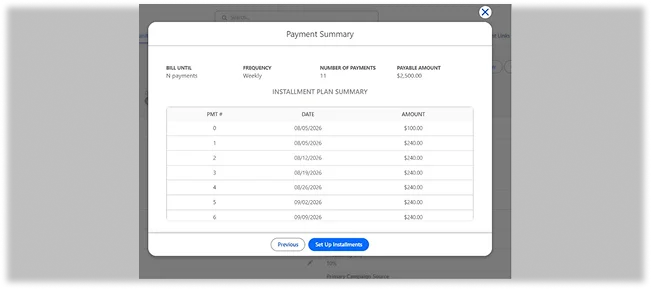
Preview the complete upcoming payment schedule before it is confirmed. A Preview button shows every future payment's date, amount, total count, and sequence before the recurring plan is set up. The records are only confirmed after the user input.
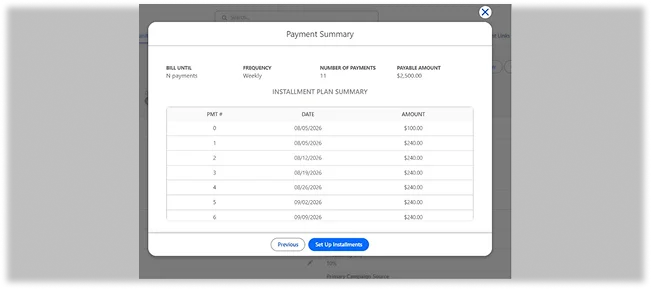
View the full lifecycle of a recurring plan in a centralized space. The 'View Transactions' option on a Recurring record shows completed, overdue, and upcoming transactions with color-coded status indicators, including Credit Memo settlement visibility.
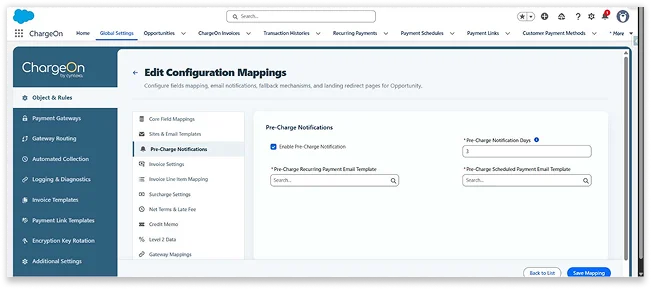
Automatically notify your customers via email before a scheduled or recurring charge goes through. This helps in reducing failed payments as the customers are notified in advance, improving payment success rates and building customer trust.
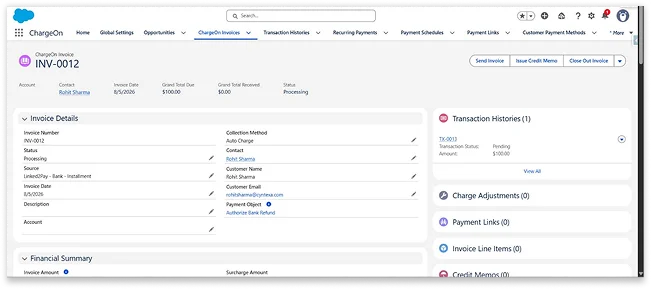
Generate a structured invoice before processing any payments. Invoices are created prior to successful payments across various methods, including Instant, Scheduled, Installment, and Subscription flows. These invoices are monitored through statuses such as Due, Paid, Partial, and Overdue. This invoice-first approach provides both the user and the customer with complete traceability and transparency.
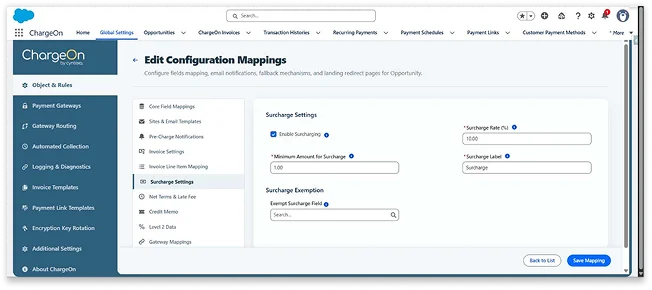
Apply a configurable surcharge to eligible credit card transactions. A surcharge is applied and shown to the customer before they confirm the payment. ChargeOn uses the Neutrino API to differentiate between credit cards and debit cards. You can set exceptions globally, for each payment gateway, or for individual customers. Surcharging helps recover card-processing costs transparently, without falsely charging the end customer.
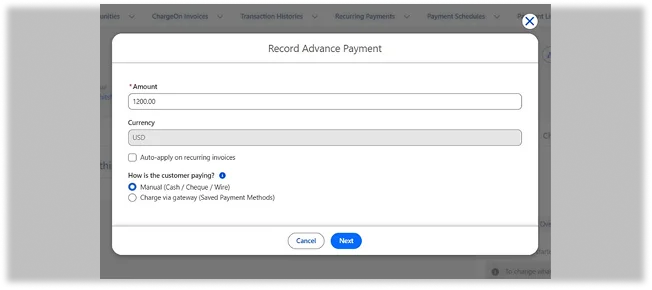
Collect money before an invoice is generated. A deposit is collected upfront, and ChargeOn automatically creates a Credit Memo that applies to the invoice once it's generated. This secures deposits early, ensuring accurate accounting in the future.
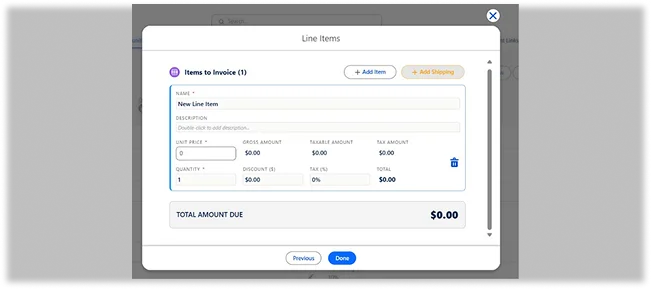
Apply discounts, tax, and shipping charges at the individual line-item level. Each line item on an invoice can carry its own discount, tax, and shipping/handling charge, with the final invoice total calculated automatically.
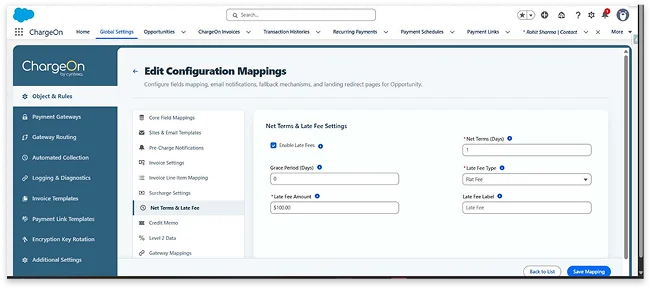
Set up your payment terms, due date calculations, and late fee rules, including grace periods, to automatically manage overdue invoices and encourage timely payments. Administrators can set these payment terms, calculations, and late fee rules during the initial setup phase.
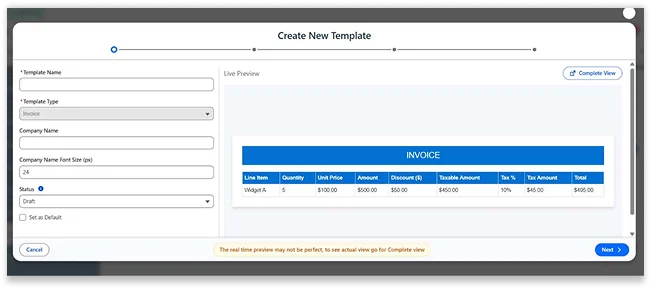
Customize invoices as per your branding guidelines. Add your company logo and choose which line-item fields appear on the generated invoice PDF. This ensures every invoice looks professional and stays consistent with your brand.
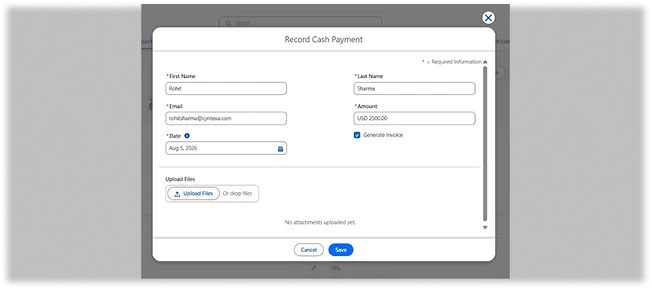
Record in-person cash payments and attach receipts to ensure that cash transactions are displayed alongside digital payments in a unified revenue view. A business user can input the cash payment manually in the Org and attach a receipt for proof. This helps you get visibility across all your revenue streams.
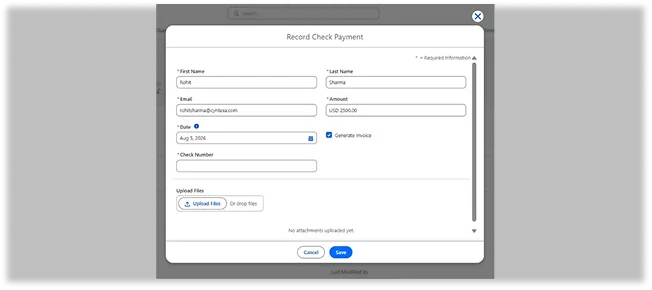
Log check payments with the check number, payer name, amount, and a supporting attachment, keeping paper payments as trackable as digital ones. With this, you get visibility across all your revenue streams.
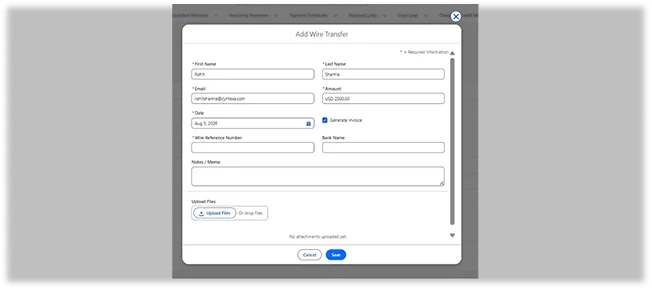
Record bank wire payments with attachment support, automatically added to transaction history, with optional invoice generation and full refund support. You get visibility across all your revenue streams.
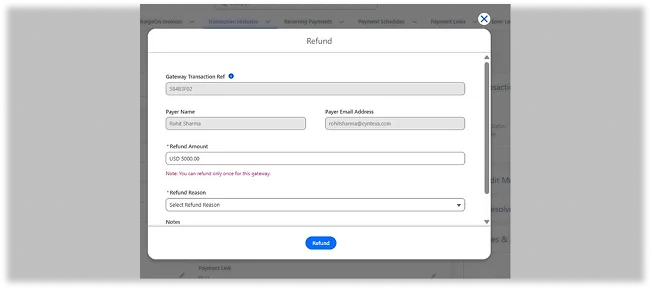
Issue a full or partial refund directly from the transaction record, across every payment type and method, with an automatic customer email notification. A Refund button on the transaction record supports full or partial refunds across every payment type and method, creates a linked "Refunded" transaction, and automatically emails the customer.
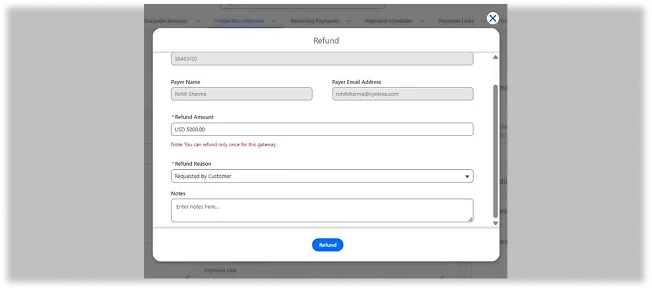
Select a configurable refund reason from a picklist and add free-text notes, keeping a clean, searchable audit trail for every refund.
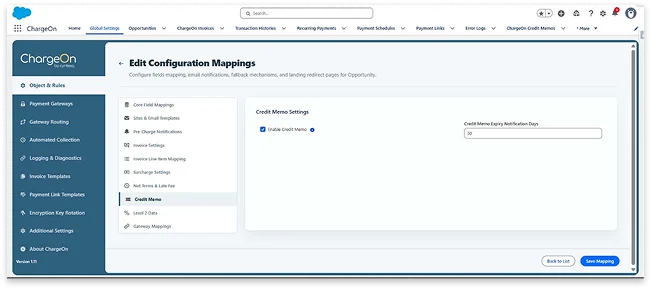
Issue and manage customer credits that apply against future invoices or balances, with configurable email delivery and expiry reminders managed via Global Settings for clean adjustments. This way, overpayments and adjustments get handled systematically.
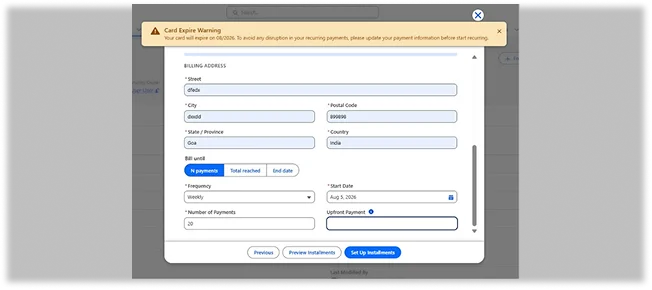
Tokenization is a process where card data is replaced with secure tokens for storage, avoiding access by unauthorized parties. Expired card alerts help the system proactively notify business users about cards that are nearing their expiration dates, especially when there are scheduled or recurring charges.
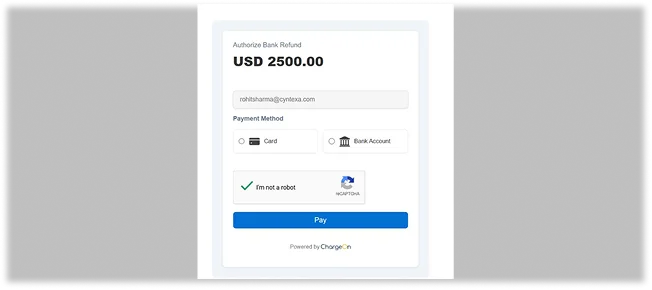
Implement reCAPTCHA verification on payment link pages before submission to block automated or fraudulent attempts, ensuring that only genuine customers proceed to your payment flow.
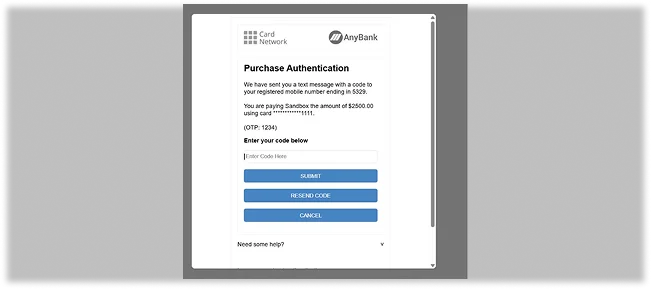
Add an extra card authentication step for card payments, with the card issuer before authorization. This helps in reducing fraud and strengthening trust on every card payment.
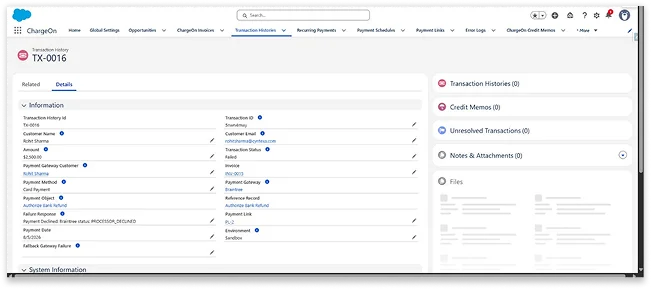
Get a centralized and complete record of every transaction with all the details, including customer ID, email, amount, status, gateway, type, date/time, everything captured. This acts as a single source of truth for every payment that's ever happened.
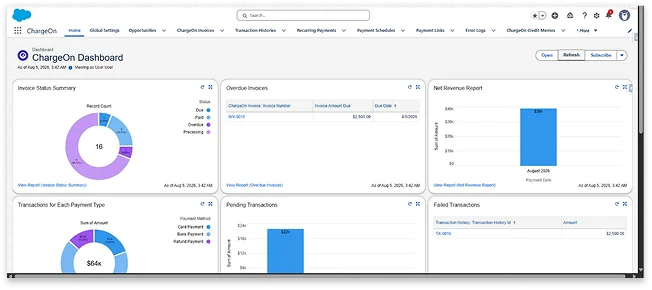
Gain financial visibility with native Salesforce Reports and Dashboards. Access pre-built reports on transactions, gateways, statuses, and refunds, organized by count, gateway, status, and monthly refunds. Additionally, benefit from support for fully custom reports. There is no need for a separate BI tool.
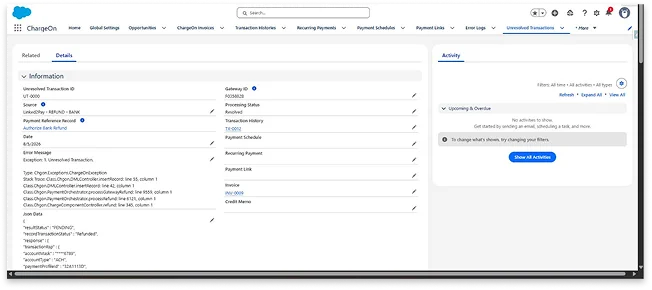
Record failed transactions or errors that occurred during record creation. Use a dedicated tab and admin alerts to manage these issues. Admins can view and resolve them using Resolve/Create Transactions, ensuring that your payments are never lost.
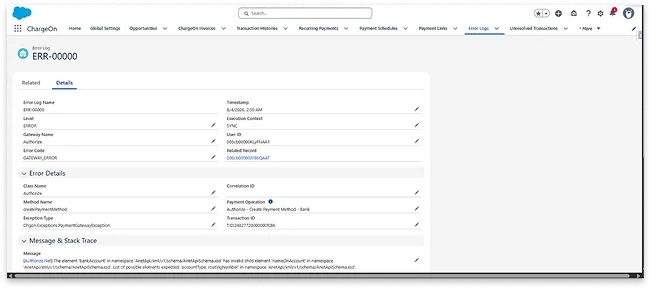
A centralized log that captures payment failures, gateway errors, and API issues, while ensuring sensitive data remains protected, allowing your team to debug more quickly with less reliance on developer time.
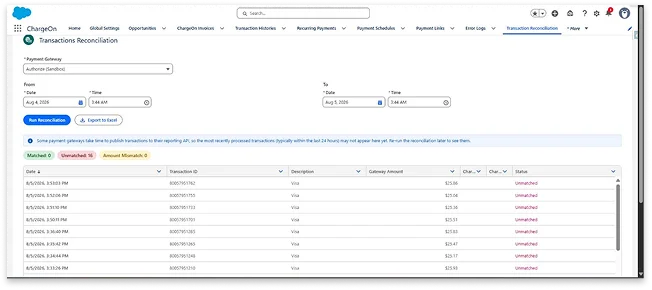
Automatically map your transactions against payment gateway records by date range, with matched, unmatched, and mismatched entries flagged for you instantly. It supports scheduled reconciliation and admin alerts, which mean discrepancies get caught before they become a problem, so your team can close the books faster with far less manual matching.
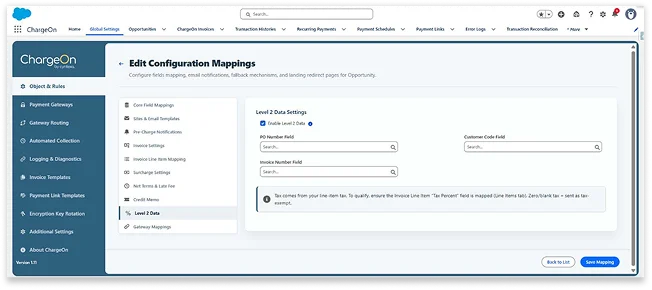
Automatically transmit enhanced commercial card details such as tax, PO number, invoice reference, customer code, and shipping to supported gateways for eligible B2B transactions. This helps qualify eligible corporate cards for lower interchange rates, which means real processing-cost savings on qualifying transactions.
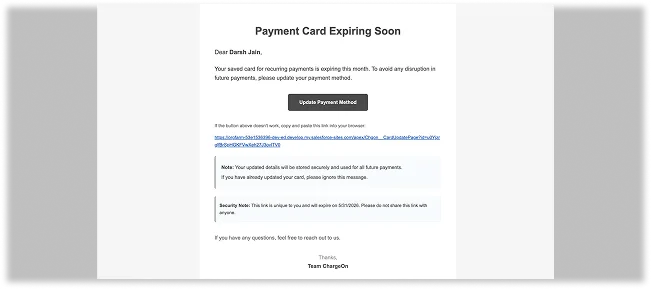
Automatically send reminder emails to customers on the 1st, 7th, 14th, and 21st of the month their card is set to expire, with a secure page to update it themselves. The new card is tokenized instantly, and future payments switch over automatically, so your team never has to chase an expiring card.
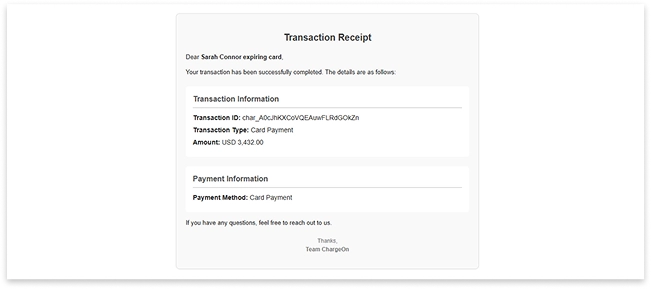
Automatically send configurable, templated emails across the entire payment journey from success, failure, refunds, authorizations, invoices, payment links, and pre-charge reminders. This keeps customers informed at every step, so they're never left wondering about the status of a payment.
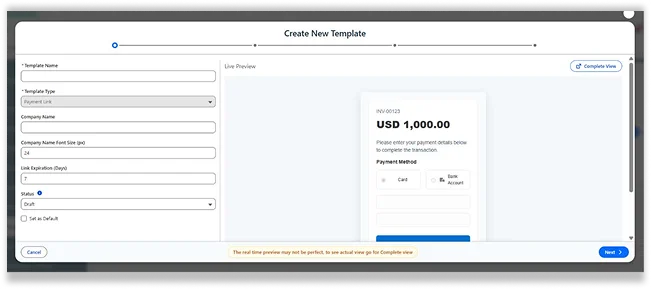
Build branded, reusable payment link templates with your own layout, appearance, available methods, and custom Terms & Conditions, previewed live before you send the link. It also lets customers retry a failed payment from the same link, which means fewer dropped payments and a more consistent brand experience.
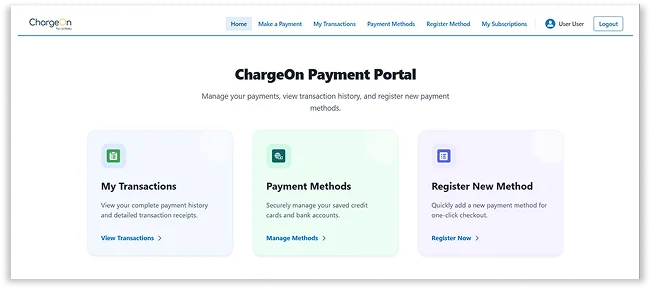
Let authenticated customers log in through Experience Cloud to view transaction history, manage or register payment methods, and complete instant payments on their own. No internal Salesforce access is required, which means customers can manage their payments securely, on their own time.
Access full ChargeOn functionality including payments, invoices, transaction history, and payment methods, directly from the Salesforce Mobile App. The interface is fully responsive, which means your team can run payments from anywhere, not just from a desk.
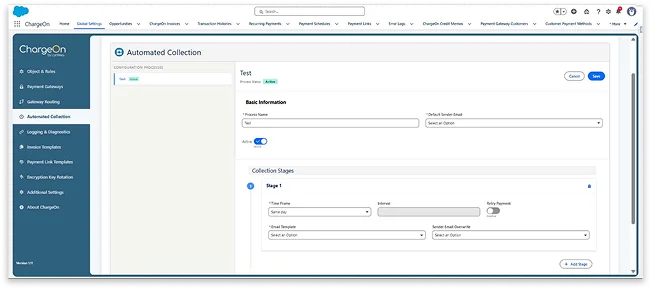
Set up point-and-click collection strategies for overdue invoices, reminder emails, payment links, and optional auto-retry of saved payment methods, across Instant, Scheduled, and Recurring payments. No code is required, which means collections run on autopilot and your team spends less time on manual follow-up.
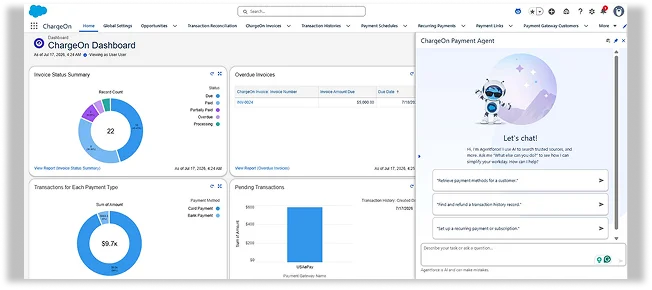
Process payments, manage payment methods, run Authorize/Capture/Void, and locate refunds through a conversational interface, inside Salesforce. No external AI tool is required, which means your team can get things done by asking instead of clicking through multiple screens.
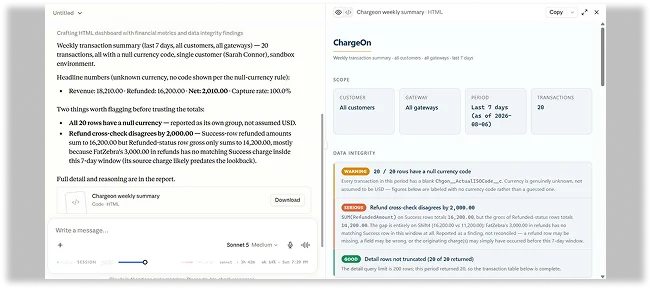
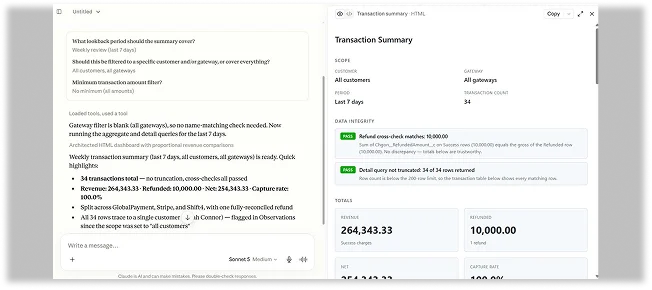
Securely connect external AI tools like ChatGPT, Claude, and Slack to ChargeOn using the Salesforce Trust Layer. Every request is validated through user permissions and ChargeOn security rules. User confirmation is always required before a payment executes, which means your payment data stays reachable and governed at the same time.
What Our Clients Say About Us

This app met all our requirements, and we have integrated PayPal and Stripe payment gateways into our system with Chargeon. It easily handled our payment processing challenges, even with frequent transactions. It tracks all the payment data easily and presents it in a very user-friendly way, and it became easy for us to understand in a short amount of time. Additionally, we appreciated their support team, as they are highly experienced and always ready to address any concerns. We are completely satisfied with their service
Read More Reviews on AgentExchange
I am John, the founder of a tech company, and I have been using ChargeOn for the past year to integrate multiple payment gateways into our Salesforce system. ChargeOn facilitates our ability to accept payments from various sources, which has greatly enhanced our customer satisfaction. Their technical support and expertise have made this complex process smooth and secure. I highly recommend ChargeOn to anyone needing the best payment integration solutions.
Read More Reviews on AgentExchange
Working with the Chargeon payments app has significantly enhanced our payment processing capabilities. Initially, our goal was to integrate the GoCardless payment gateway, and Chargeon's implementation team offered us the best solution that included this integration. Beyond integrating GoCardless, their app has added several valuable features such as recurring payments, support for multiple payment methods, and user-friendly reporting and dashboards. The enhancements have significantly simplified our payment processes and provided more value to us. We highly recommend the Chargeon app for anyone looking to improve their payment systems and compliment the team for their great customer service.
Read More Reviews on AgentExchange
I am the Salesforce Admin, and I am in charge of setting it up in our org. Despite having so many customizations, the support was quick to respond to our requirements and helped us set up quickly in our Org. Could not ask for anything more in support. If you are on the fence about ChargeOn, this is a tipping point to install it!
Read More Reviews on AgentExchangeEvery payment scenario. One Salesforce-native platform.
See how these features work in your Org. Get a 30-day free trial via AgentExchange for hands-on experience, or connect with us to customize it as per your business workflows and requirements.