
TOC
Table of Contents
What is Salesforce Subscription Management?
Salesforce Subscription Management (SSM) automates the entire lifecycle of recurring revenue products or services from initial purchase to upgrades/downgrades, add-ons to cancellations, and billing/invoicing to renewals. It empowers teams to launch and manage subscription plans (monthly, annually, or usage-based) without creating administrative chaos.
SSM is built within Salesforce Revenue Cloud and enables subscription terms to process instantly when a customer clicks Buy or Renew, eliminating juggling between separate tools for orders, billings, and renewals.
Now, let’s have a closer look at the key features of SSM and understand how to manage them in Salesforce.
Key Features of Salesforce Subscription Management
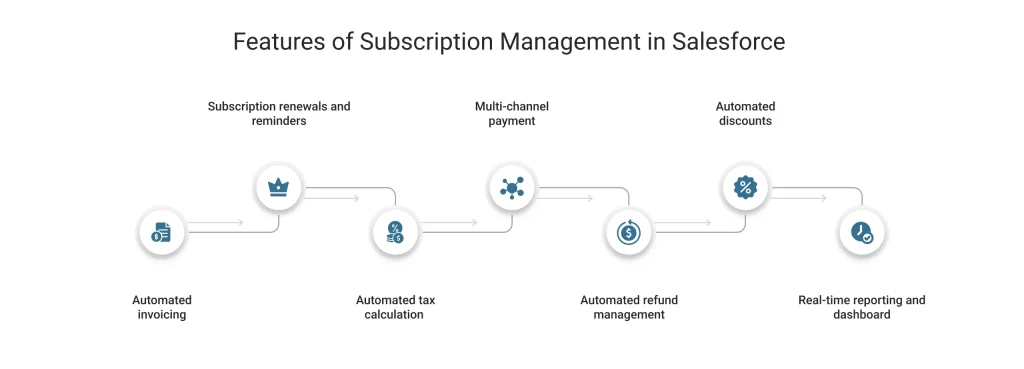
1. Automated invoicing
Subscription Management in Salesforce streamlines the billing process of your business through its built-in Buy Now flow template. With this template, subscription-based companies can automate the invoice generation every time a customer renews a subscription plan.
Moreover, it enables businesses to quickly send the auto-generated invoices to the right customers, which saves time and minimizes billing errors.
2. Subscription renewals and reminders
Subscription Management integrates with Salesforce CPQ to create subscription records and track the start and end dates of each subscription plan. After a subscription ends, it also helps business teams automatically generate renewal quotes and adjust pricing for prorated plans as needed.
It enables subscription-based businesses to integrate with Marketing Cloud or other tools like Gmail, Marketo, and more. This way, you can seamlessly communicate with the customers. How? Let’s see.
You can send personalized reminder emails to your customers before a subscription plan is about to end. For example, 45, 60, or 90 days in advance, to avoid missed payments. These emails include the plan details and a clear call to action leading to a direct payment link for hassle-free and quick renewals.
3. Automated tax calculation
SSM helps businesses to integrate the tax compliance software, like Avalara, with Salesforce Revenue Cloud for automated calculation of taxes during each transaction.
This also helps businesses to configure all the tax rates and rules in Salesforce billing. Once this is done, tax deductions are automatically applied according to the defined tax settings for each product. This reduces compliance issues for your business by making your invoice accurate, hassle-free, and compliant.
4. Multi-channel payment
Subscription management makes your business flexible enough to receive payments as per the convenience of the customers and payment modes chosen by them. Your customers can easily purchase, renew, and upgrade their subscriptions through a self-service portal, a mobile application, or an e-commerce site.
This seamless experience becomes possible through the following components working behind the scenes:
- The REST API integrates the front-end channels with Salesforce’s backend processes. This enables real-time buying, renewals, and upgrading of subscriptions.
- Integration with Experience Cloud enables self-service portals and mobile applications for managing subscriptions.
- Commerce Cloud enables smooth e-commerce checkout for subscription services.
- Salesforce CPQ and Billing together help to configure plans, invoicing, pricing, and payment processing.
All these Salesforce components enable omnichannel subscription management for your business. For instance, customers can come and browse a subscription plan on your website. They can finish with the final payment process through a sales call, without repeating steps and losing progress.
5. Automated refund management
Subscription management in Salesforce helps businesses to easily manage their refund processes in their subscription plans. Under this feature, businesses can check the unused portion of the billing period after their customer cancels or changes their plan. After calculating the unused portion, its value is calculated as credits. If you want to apply these credits to future invoices, a credit memo can be issued.
Coming to processing refunds. You can send a refund request to the payment gateway, like PayPal, Stripe, or more. This will further be directed to the end customer.
6. Automated discounts
SSM integrates with Salesforce CPQ to simplify the discount calculation and automate it for rewarding your loyal subscribers. You can set discounts as per subscription tier (a premium or enterprise plan) or as per duration of plans (annual to multi-year plans).
7. Real-time reporting and dashboard
Subscription Management in Salesforce provides your business with a built-in dashboard. It visualizes interactive charts, trend lines, and other elements. This way, you can monitor performance over time and identify areas of revenue leakage. You can gain real-time insights into:
- Key metrics like churn rate
- Monthly recurring revenue
- Renewal information
- Customer lifetime value details
- Information regarding failed payments.
These insights are helpful in accurate revenue forecasting.
Benefits of Salesforce Subscription Management
1. Increased customer lifetime value (CLV)
By automating renewals and providing self-service options, SSM removes the friction that frustrates customers. A seamless experience through it enables customers to upgrade effortlessly, helping in increasing retention rates and revenue without raising the acquisition costs.
2. Accelerated time to cash
Manual invoicing is the bottleneck in cash flow management. Salesforce Subscription Management automates the order-to-cash lifecycle from the moment when a customer clicks subscribe to the moment the invoice is generated, reducing the Days Sales Outstanding.
3. Single source of truth
SSM keeps your customer data, subscription terms, and payment history within Salesforce. This gives your sales and support teams a unified view of customers, empowering them to predict churn risks and spot upsell opportunities.
4. Scalability without headcount
SSM handles the subscription volume easily and enables you to scale your subscriber base quickly without needing to hire an admin or finance team to handle the paperwork.
5. Predictable revenue insights
With Salesforce Subscription Management, you can forecast certain revenue with clear visibility into contract dates, usage, and account health of a customer. This helps you track incoming revenue and approximate predictable revenue.
6. Operational efficiency
Salesforce Subscription Management automates invoice generation, billing schedules, refunds, credit memos, and proration. This reduces manual work for sales ops and finance teams.
Final take
Salesforce Subscription Management is a comprehensive solution for subscription-based businesses. It helps them automate invoicing, tax calculation, handling renewals, refunds, and allotment of discounts. Moreover, with real-time dashboards and multi-channel support, you not only get complete visibility of your customers’ lifecycle but also get flexible and fast scalability for your subscription business.
However, in comparison to the Salesforce Subscription Management data model, Salesforce billing follows a unique data model focused on invoicing and revenue management. This often results in delayed order activation and payment confusion.
That’s exactly where a Salesforce payment processing and orchestration platform, like ChargeOn, can add some value. It bridges the gap by syncing invoices, payments, and subscription data in real time, keeping your entire payment process connected and hassle-free within Salesforce.