
TOC
Table of Contents
“Payment gateway and payment processor? Aren’t they the same thing?”
This question might have crossed your mind, as most businesses use these terms interchangeably. However, both terms surely differ in their functions and working.
While the payment gateway securely captures customers’ payment information, the processor works in the background to ensure the funds are securely transferred to the correct account.
This blog is your detailed guide to understanding and learning the difference between a payment gateway vs. payment processor, two terms often mistaken as the same.
Let’s dive in.
What is a Payment Gateway?
A payment gateway is a service that securely collects and transmits payment information from customers to payment processors, enabling businesses to accept payments. This is the initial step in the payment process. It is the customer-facing instance where they can feed in their payment information to make payments.
Payment gateway captures the card, wallet, net banking, and other payment details of the customer and sends them securely to the payment processor.
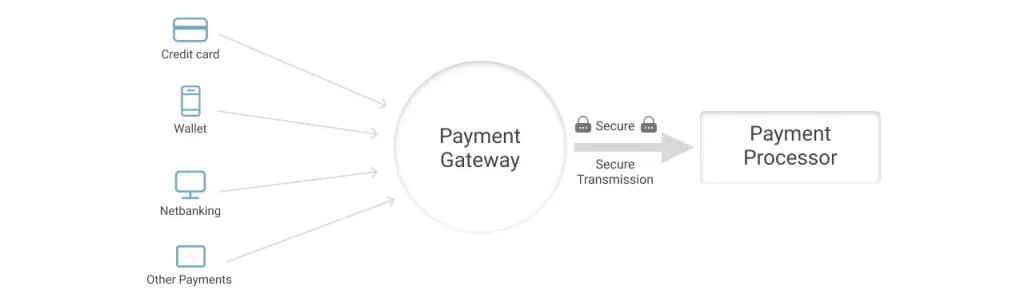
It lists several payment methods, including:
- Debit card
- Credit card
- Net banking
- UPI (India)
- ACH
- Wallets and more.
It is up to the customer what payment method they use for transacting.
Key responsibilities of a payment gateway
1. Tokenization
Tokenization replaces the actual card number with unique random tokens such as tok_visa_4532. These tokens are stored in the merchant’s database. Therefore, if hacked, attackers get useless tokens instead of real card data. Also reduces PCI DSS compliance scope.
2. 3D Secure / OTP flows
The gateway initiates additional verification through the customer’s bank via OTP, password, or biometric. This reduces fraud and chargebacks.
3. Handling Success/Failure Redirects
It shows the customer “Payment Successful” or “Card Declined” messages immediately.
4. Webhooks
It sends automatic notifications to the merchant’s backend to trigger order fulfillment, emails, inventory updates, etc.
They both are essential parts of the payment process, but they handle very different tasks. To understand this better, let’s explore the key differences: payment gateway vs processor.
Types of payment gateways
1. Hosted payment page
Your customer starts checkout on your website, then gets sent to another company’s website to pay, then comes back to your site.
Imagine you are shopping in a store, but when it’s time to pay, the cashier says, “Follow me outside to this payment kiosk.” You go there, pay, come back inside, and get your receipt.
2. Embedded
Your customer stays completely on your website and enters payment details in a form that looks like it’s part of your checkout. It’s actually the payment company’s form.
It’s like a store where the payment counter is built into the checkout aisle. Customers never leave your store and never even realize they’re interacting with a payment system.
3. API-based
You build your own payment checkout from the start, as per your business requirements. According to your brand theme and colors, resonate with your website.
What is a Payment Processor?
A payment processor works after the payment gateway, in the backend. It facilitates the actual transfer of the amount from the customer’s bank to the merchant’s bank and vice versa in case of returns. Think of it as a courier boy who picks up the parcel from the dispatch center to your home.
The payment processor checks and approves payments that prevent fraud and improve security. It then communicates with card networks and banks to ensure the successful transfer of funds. This safeguards both the merchant and the customer.
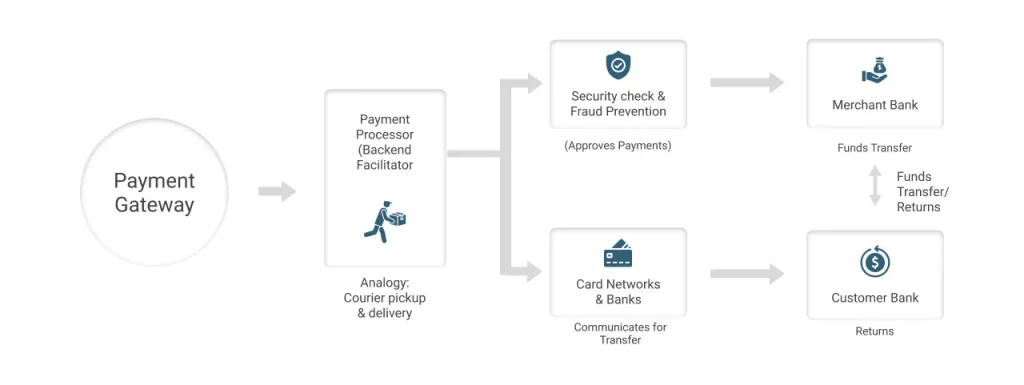
Key responsibilities of a payment processor:
1. Authorization
When the customer clicks on ‘pay,’ the processor checks with the customer’s bank whether the card, bank account, or other payment method is real, not blocked, and has enough balance or credit to make the payment. After this, it returns an approval or a declination code in a few seconds.
2. Clearing and settlement
After approval, the processor sends all the transaction details through the card network to both parties’ banks. They agree on the amount, fees, and currency. Then the processor helps transfer the actual money from the customer’s bank to your merchant account, usually in batches.
3. Handling chargebacks and disputes
If the customer disputes a transaction, the processor and your acquiring bank manage the chargeback flow, seeking evidence from you, sending it to the card network and issuer, and applying rules and fees.
How do a Payment Gateway and a Payment Processor work together?
Here is a comprehensive process of gateway payment processing:

Step 1: Starting the Transaction
Initially, the customer comes to your website, chooses a product, adds it to the cart, and proceeds to checkout.
Step 2: Payment Gateway’s Involvement
When the customer is at the checkout and ready to pay, the payment gateway shows multiple payment methods to choose from. These include:
- Debit card
- Credit card
- Net banking
- UPI (India)
- ACH
- Wallets and more.
The customer enters the details; the gateway collects and encrypts them.
Step 3: Communication with the Payment Processor:
The Gateway then communicates with the processor by transferring the encrypted data.
Step 4: Processor Authorization
Moving on, the processor receives this data. It authorizes the transaction with the issuing and receiving banks before moving forward. It checks for available funds and proceeds with a secure transaction.
Step 5: Transaction approval or declining
Based on the information shared by the issuing bank, the payment processor determines whether to approve the transaction or decline it.
Step 6: Feedback to Gateway
After the confirmation, the status is shared with the payment gateway. Further, it is shared with the online platform.
Step 7: Customer and Merchant Notification
The merchant receives the confirmation of the purchase to proceed with fulfilling the order. As well as, the customer is also notified of successful order placement.
Step 8: Settlement of funds
The payment processor oversees the transfer of funds from the customer’s account to the merchant’s account.
Step 9: Transaction Completion
At last, the customer and the merchant have a transaction record, which also acts as proof.
This record includes information such as transaction amount, date, time, payment method used by the customer, and the status of the transaction.
This whole gateway processing takes only a few seconds or minutes to complete.
Payment Gateway vs. Payment Processor: Key Differences Recognized
Both are essential parts of the payment process, but they handle very different tasks. To clear the common confusion around payment processor vs gateway, here’s a side-by-side comparison:
| Criteria | Payment Gateways | Payment Processors |
|---|---|---|
| User interaction | Directly interacts with the customer through the checkout page. | Operates in the background with no direct interaction with customers. |
| Security & compliance | Security is maintained by replacing the actual card data with a non-sensitive and unique character, namely a token. These tokens hide original card details.For compliance, payment gateways follow PCI DSS standards that help in avoiding data breaches. | Processors rely on a real-time fraud detection mechanism involving machine learning algorithms for blocking suspicious activities.They also maintain compliance with country-specific regulations like GDPR, for preserving user privacy. |
| Integration with business systems | Easily integrates with websites or applications using plugins, APIs, or hosted checkout pages that do not need extensive coding. | More complex to be integrated, as it usually requires connection with your bank account, in-store POS hardware, or backend systems, which consumes more time and technical effort. |
| Handling failed payments | Provides reactive handling, displays failure messages, allows retries for failed payments, and even suggests alternate payment methods. | Adopts proactive detection of the failure cause and communicates the status to the gateway. |
| Dependency | Dependent on the payment processor to authorize and complete transactions. | Depends on the payment gateway to collect customer details. |
| Role in transaction | Capture and transfer the payment information securely to the processor. | Authorizes and processes payments by communicating with banks, card networks. |
How can you select the right Payment Gateway and Processor?
Now that you are aware of how they work together and how they differ, you might be thinking, “How would I choose the right one for my business?”
Choosing the right gateway processing setup requires evaluating both the payment gateway and payment processor for your business model.
How to select the right payment gateway?
Consider the following aspects:
Ease of integration
Check how easy it is for your tech team or your implementation partner to integrate the gateway into your website or application.
What methods of integration does it offer?
- APIs/SDKs: These are the ready-made building blocks for developers.
- Documentation: Clear, step‑by‑step guides that help with the integration process. If this is not optimally designed, it might affect the integration process, making it slow.
Supported payment methods
Look for widely used payment methods, including:
- Cards: Visa, Mastercard, RuPay, Amex
- Wallets: Google Pay, Apple Pay, etc.
- BNPL: Buy Now Pay Later options
- Payment links
- Net banking
Security and compliance aspects
Ensure the payment gateway adheres to PCI DSS, has tokenization, performs regular security testing, and ensures constant updates in compliance.
You can consider looking for these aspects in the gateway while also keeping your unique business requirements a priority.
As we have discussed before, payment processors work in the backend. You can ask the provider the following questions:
Questions to ask regarding payment processors
Region-wise currency acceptance:
- In which regions can it process payments?
- In which currencies can it process payments?
- Does it accept payments from customers in your target countries?
- Can it settle payments in your home currency or multiple currencies if needed?
Processing fees and pricing structure:
- What is the percentage you charge per transaction?
- What is the fixed per‑transaction fee?
- What are the monthly minimums, setup fees, cross‑border fees, and chargeback fees
Settlement times and payout currencies
- When and how do you actually get your money?
- What is the settlement time: T+1, T+2, T+7, etc. (days after transaction)
- What are the payout currencies that the vendor supports?
Chargeback handling and dispute support
- Are there any tools or features available to view, track, and respond to customer disputes?
- What is the evidence that you get, such as invoices, logs, proof of delivery, etc.?
- Clear timelines and fees per chargeback
Reliability and uptime
- How often is the processor “up” and working?
- Uptime SLA (e.g., 99.9%)
- How the vendor handles incidents and communication
- Quality and speed of technical and merchant support
- How does the vendor handle downtime?
Final take
Understanding how payment gateways and processors differ yet complement each other helps you select the right payment solution that ensures security, speed, and a smooth checkout experience. You do not need to choose one over the other, you typically need both.
However, to enhance their capabilities to work in your business and ensure their optimal integration with your Salesforce environment, you need a seamless connector. One such solution is ChargeOn. It is a Salesforce-native payment processing and orchestration platform that:
- Centralizes all payment activities inside Salesforce.
- Support diverse payment methods (instant, recurring, scheduled).
- Offers flexibility to map payments to any standard/custom Salesforce object.
- Enhance security
- Provide real-time insights through reports, dashboards, transaction history, and much more!
ChargeOn also provides real-time integration with 14 key payment gateways like Stripe, PayPal, Authorize.Net, Razorpay, and more.