
Table of Contents
What is Salesforce Invoicing?
Salesforce Invoicing is a versatile solution to handle all your invoicing needs within Salesforce. It allows businesses to create, send, and manage invoices using Salesforce capabilities.
As a part of the Salesforce Billing module, it automates the entire journey from invoice creation to payment tracking and financial reporting. By eliminating the need for disjointed third-party tools, it ensures a seamless flow of data across your business.
With this unified approach, you can ensure the timely dispatch of invoices and receive payments faster, reducing delays in your revenue cycle.
But how does it streamline the invoicing process for your business, and how does it differ from Salesforce Billing? Well, in this blog, we will figure out the same.
Let’s get started!
Salesforce Billing vs Salesforce Invoicing

Many users get confused between Salesforce billing vs invoicing, but they serve different roles.
You can think of Salesforce Billing as the brain that manages the complex rules, product catalogs, tax calculations, and revenue schedules. It basically handles the complete post-quote revenue cycle (fulfillment, invoicing, and revenue recognition). While Salesforce Invoicing is the action within the billing that automatically generates the customer-facing document, calculates the final bill, and requests payment.
Why does your business need Salesforce Invoicing? Top benefits
Here is how Salesforce Invoicing streamlines the process:
1. Automated invoicing
With Salesforce, your entire invoicing process gets automated. From creating online invoices in Salesforce to sharing them with your customers, everything is streamlined. You also get the option to customize your invoicing process as per your most suitable needs.
Since Salesforce holds your customer data, product details, and pricing information, the system automatically pulls this information into the invoice. This eliminates the need for manual effort and reduces dependency. Therefore, reducing errors and saving your money.
2. Keep track of all your payments
After you share invoices with your customers, Salesforce invoicing helps you keep track of whether you have received payments against a particular invoice or not. It allows you to:
- Get complete control over your cash flow management.
- Ensure timely payment of the receivables.
- Identifies skipped and lapsed invoices.
3. Pre-made invoicing templates
Salesforce invoicing offers pre-designed invoicing templates that are fully customizable. You can easily add fields to your Salesforce invoice and change formats as per your preferences.
Moreover, it allows you to design professional-looking templates that support your brand identity by including your company’s logo, information, and more.
4. Allows customers to make payments electronically
As you share a Salesforce invoice with your customer through email or any other communication channel, invoicing allows you to include a direct payment link.
Customers can view the invoice details and make a payment immediately via electronic methods. This ensures that you receive your payment for the products and services you have rendered, shortening the payment cycles.
5. Real-time reporting and analytics
With this feature, you can dive deeper into your business data and gain a better understanding of it.
With Salesforce, you get a diagrammatic view of all your financial health through dashboards. You can instantly see outstanding balances, revenue trends, and areas where your collection process needs improvement.
6. Improved customer experience
Salesforce invoicing is not only beneficial for you but also for your customers. Automated reminders ensure customers don’t miss payments, helping them continue their subscription without service disruptions.
How does Salesforce Invoicing connect your financial ecosystem?
One of the crucial advantages of Salesforce invoicing is that it connects your sales data with your back-office financial systems.
Salesforce Invoicing with CPQ (Sales to finance)
When your sales rep finalizes a quote in Salesforce CPQ, it converts into an order. Salesforce billing then automatically picks up this order data to generate an accurate Salesforce invoice.
This invoice creation process:
- Eliminates the need for manual data entry,
- Ensures accurate invoices in Salesforce
- Streamlines the lead-to-cash process.
Salesforce Invoicing and ERP system (Front to back office)
Salesforce invoicing and ERP integration help you gain a complete view of the financial health of your business. You can easily transfer all your invoices, payments, and other financial data to your ERP system. Therefore, making it your trustworthy source for general ledger and financial reporting. With automation in your hands, duplicate entries are eliminated, and you can ensure data accuracy.
Native integration options with Salesforce Invoicing
If you seek more advanced and additional features beyond what Salesforce invoicing offers, you can go for official or native applications and solutions. These solutions address all the limitations of Salesforce invoicing. Such as integration with multiple payment gateways and an enhanced transaction limit.
One such versatile application is ChargeOn. It offers:
- 14+ payment gateway integrations, including Stripe, PayPal, Adyen, and Authorize.Net.
- Supports multiple payment methods, such as credit/debit cards, bank transfers (ACH), wallets, UPI, or even Buy Now Pay Later (BNPL) options.
- Provide recurring payment management for comprehensive subscription management and recurring billing options.
- Improved security and governance through tokenization (where sensitive card/payment data is replaced with a secure token) and multi-factor authentication for payment authorization.
| See Why Users Rate ChargeOn 4.95⭐ on AppExchange |
How to set up Salesforce Invoicing for your business?
Implementing Salesforce invoicing requires configuring it with specific rules that determine how your business recognizes revenue. Here’s how you can set up:
Step 1: You first require a Salesforce billing license, which includes the invoicing process. Then install the billing package in your org and navigate to the billing settings to enable invoicing features.
Step 2: Now, you need to configure billing rules:
- Billing rules: Decide if a product creates an invoice or not.
- Tax rules: Determine how tax is calculated based on the location.
- Revenue recognition rules: Define how revenue is recognized.
The user or the admin setting up the invoicing must have the required permission sets and knowledge for the same.
Step 3: You have to set up an Invoice scheduler to run automatically, such as daily or monthly. This tool scans for all billable orders and generates invoices in bulk.
Step 4: Before going live, you should run the entire flow in a Sandbox environment. For example, you can create a dummy Quote, convert it to an Order, and let the Scheduler generate the Invoice to ensure all tax and billing lines calculate correctly.
However, if you find it complex to do so, we suggest that you look for a Salesforce consulting partner who can help you with migrating your data and setting up the whole process with ease.

Top Tips for Optimizing Salesforce Invoicing
Here are a few tips to optimize your Salesforce invoicing process and gather more efficient results.
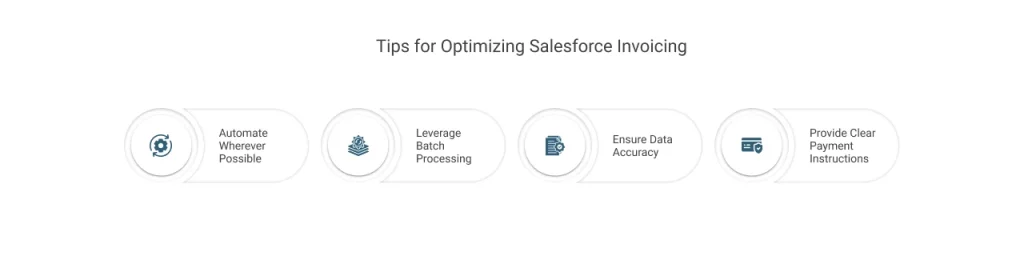
1. Automate Wherever Possible
Leverage automation tools like
- flow,
- process builders,
- workflow rules, and
- AI capabilities like Agentforce AI agents
These tools are offered by Salesforce for invoice generation and sending follow-up emails. It reduces manual efforts and the chances of errors.
2. Leverage Batch Processing
Salesforce has limits on batch processing for invoices and payments. While businesses with high volumes of transactions must utilize batch processing. For the same, you need a solution that enhances the process. ChargeOn is one such solution that utilizes batch processing to manage:
- large data volumes and heavy operations,
- preventing breaches of standard limits and
- allowing the system to handle everything in manageable portions.
3. Ensure Data Accuracy
Implementing validation rules and checks on invoice data fields can prevent common errors like:
- duplicates,
- missing fields, or
- incorrect amounts that can delay payments.
4. Provide Clear Payment Instructions
Include detailed payment terms, due dates, and multiple payment options on invoices to reduce customer confusion and late payments.
Conclusion
There you have it all! Salesforce Invoicing is your go-to solution for boosting your invoicing process, reducing customer churn, and ensuring timely payment of receivables from your customers. From creation to its dispatchment and seeking follow-up on your behalf, this automated process streamlines your revenue realization process.
Salesforce Invoicing is surely a reliable solution. But to address niche requirements, such as strict gateway restrictions, spikes in transaction volume, or specialized batch workflows, many customers choose a complementary solution.
ChargeOn, a scalable payment processing and orchestration platform, offers that solution. It integrates Salesforce with multiple payment gateway options, improves throughput, and simplifies complex payment operations without replacing your existing invoicing setup.