

TOC
Table of Contents
Running an online store on Salesforce gives a single, connected view of every customer.
However, as the operations grow and the volume increases, sometimes Salesforce’s native capabilities may fall short. Therefore, to extend these capabilities, businesses use Salesforce e-commerce integration apps.
With the right combination, orders, payments, and support all flow into one system, making the teams act faster than usual.
For businesses exploring SFDC e-commerce tools or evaluating Salesforce Commerce Cloud integrations, this blog covers the must-have Salesforce e-commerce integrations across every function. You will also learn to decide which ones are best suited to your business needs.
Must-have Salesforce e-commerce integrations
Here are key integrations across the different categories that most e-commerce businesses need to run their business efficiently.
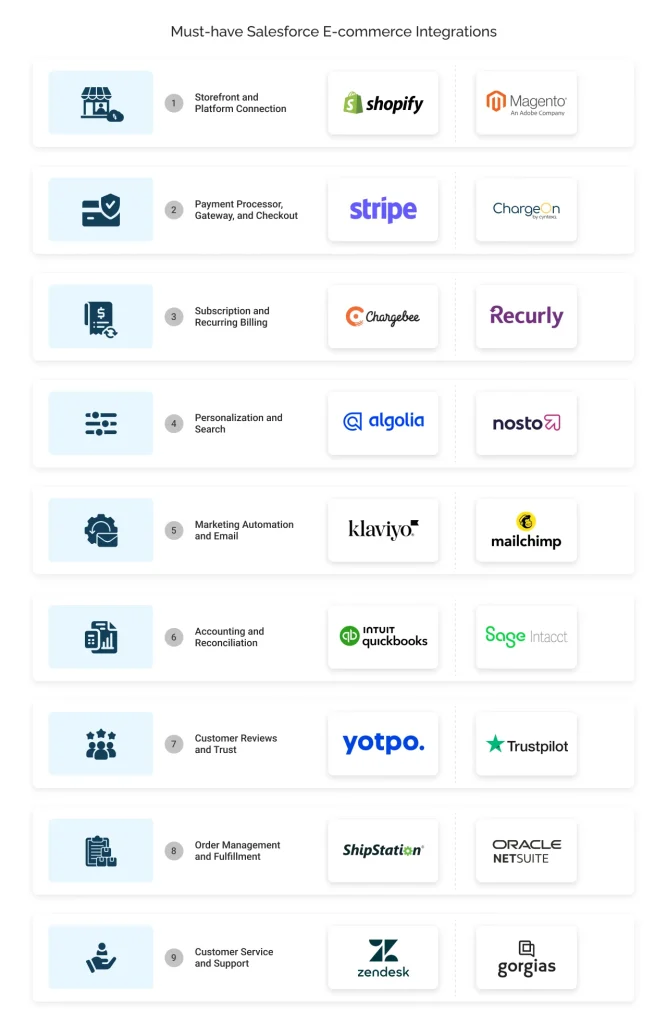
1.1 Storefront and platform connection
A storefront is where customers browse and buy. Salesforce is where you manage those customers and run post-sale operations. Connect the two, and all your orders, inventory, and customer records sync automatically instead of being moved manually between systems.
Shopify
Shopify is one of the most widely used storefront platforms. When you connect it to Salesforce, customer profiles, order history, and product data sync in real time. It provides sales and support teams with purchase history and refund activity without leaving the CRM.
Magento
Magento, now Adobe Commerce, was built for businesses running large or complex catalogs. The challenge here isn’t just syncing orders, it’s keeping pricing and stock levels identical across multiple storefronts. Magento’s API-based Salesforce integration solves exactly that, syncing catalog, order, and customer data even at scale.
1.2 Payment processor, gateway, and checkout
Checkout looks like one step to the customer, but three separate pieces make it work. The gateway captures and encrypts payment data, and the processor authorizes the transaction and updates its status. Connect both to Salesforce, and every checkout updates the records without manual entry.
Stripe
Stripe handles the gateway side of checkout for a large share of online stores. Once connected to Salesforce, transaction status, refunds, and payment method details land directly on the customer record. It gives finance teams a live view of revenue without switching tools.
ChargeOn
ChargeOn takes a different approach: instead of connecting one gateway, it can route transactions across multiple gateways and processors directly inside Salesforce. Every transaction, whether approved or declined, updates the order status automatically, so finance and support teams never have to leave the CRM to check payment status.
1.3 Subscription and recurring billing
Subscription businesses can’t run billing manually. All the renewals, upgrades, and failed payments should trigger the right action without someone watching a dashboard. A recurring billing integration handles that automatically, based on rules set inside Salesforce.
Chargebee
Chargebee owns the subscription logic itself: plans, upgrades, cancellations. What it adds to Salesforce is visibility. The data of subscription status and billing history land on the customer record, so revenue teams can track recurring revenue without ever exporting a report.
Recurly
Recurly’s strength shows up at the point of failure. When a renewal succeeds or fails, the customer account updates in Salesforce immediately. Therefore, helping teams catch a failed payment and reach out before it turns into a churned customer.
1.4 Personalization and Search
Customers expect product recommendations and search results that actually reflect what they want. The catch is that personalization tools can only do that well if they’re working from the same customer data Salesforce already has.
Algolia
Algolia is an AI-powered search and discovery platform designed to provide fast and relevant on-site search results. The Salesforce connection runs in the opposite direction here. It means that search behavior flows back into customer profiles, giving marketing teams a way to segment audiences by what people actually searched for, not just what they bought.
Nosto
Nosto is an AI-driven commerce personalization platform that analyzes customer behavior to deliver tailored product recommendations, content, and shopping experiences. Connected to Salesforce, those behavioral signals enrich the customer record directly, so sales teams walk into a conversation already knowing what the customer has been looking at.
1.5 Marketing automation and Email
Cart recovery emails, promotions, and post-purchase follow-ups, none of it works if the campaign tool is guessing the data instead of working from real customer data. A marketing automation integration pulls that data straight from Salesforce.
Klaviyo
Klaviyo works specifically for e-commerce email and SMS. Once it’s tied to Salesforce, customer segments, purchase history, and campaign engagement are all in one place. The marketing team can build a campaign without manually exporting a list.
Mailchimp
Mailchimp covers broad email marketing for a wide range of stores. By connecting it to Salesforce, your sales team can get insights into every campaign’s performance and its impact on customer records.
1.6 Accounting and reconciliation
Every sale has to show up correctly in the books, and at volume, it becomes difficult to manage. An accounting integration moves transaction and invoice data from Salesforce into the finance system automatically.
QuickBooks
QuickBooks is the default accounting tool for most small and mid-sized e-commerce businesses. Connected to Salesforce, invoices, payments, and customer balances sync without anyone re-entering a transaction, which means the finance team can close the books on time.
Sage Intacct
Sage Intacct steps in once accounting needs get more complex than QuickBooks can handle. Its Salesforce integration focuses on revenue recognition specifically, keeping it accurate across both systems and cutting down the manual work that piles up at month-end close.
1.7 Customer reviews and trust
What customers say about a product on the storefront directly shapes whether the next customer buys it. The point of a review integration is to get that feedback in front of the teams who can act on it.
Yotpo
Yotpo collects and displays product reviews right on the storefront. Connect it to Salesforce, and review content and ratings that land on the customer record, so the support team can follow up on a negative review before it turns into a churned customer.
Trustpilot
Trustpilot operates a level up from Yotpo as it tracks brand and service reputation, not just individual product reviews. Surfaced inside Salesforce alongside customer history, it gives teams insights on overall satisfaction instead of just order-by-order feedback.
1.8 Order management and fulfillment
An order doesn’t end at checkout, it still has to move through picking, packing, and shipping without delay. An order management integration tracks that journey and keeps Salesforce updated as the status changes.
ShipStation
ShipStation handles shipping labels and carrier selection once an order is ready to go out. This Salesforce integration keeps tracking numbers and delivery status updated on the order record automatically, so support can answer a shipping question without opening a separate tool.
NetSuite
NetSuite operates a level above ShipStation, managing inventory and order flow for larger operations running multiple sales channels at once. Integrated with Salesforce, it keeps stock levels and order status consistent everywhere, which is what actually prevents overselling during a demand spike.
1.9 Customer service and support
A support ticket without order context is just guesswork. A support integration fixes that by bringing ticketing and conversation history into Salesforce, right next to the customer’s purchase data.
Zendesk
Zendesk manages the ticket and conversation side of support. Linked to Salesforce, every ticket connects directly to the customer and order record, so agents stop switching tabs just to find out what someone ordered.
Gorgias
Gorgias was purpose-built for e-commerce support, with order data backed into every ticket by default. This Salesforce integration carries that same order along with refund history, giving agents the full picture before they reply to the customer.
That’s the full integration stack, nine categories, each solving a different gap. But here is what businesses are actually fixing when they put this stack together.
What does the right E-commerce integration stack actually fix?
Most businesses invest in Salesforce e-commerce integration because specific parts of the customer journey are leaking revenue. Here is what they are actually trying to fix.
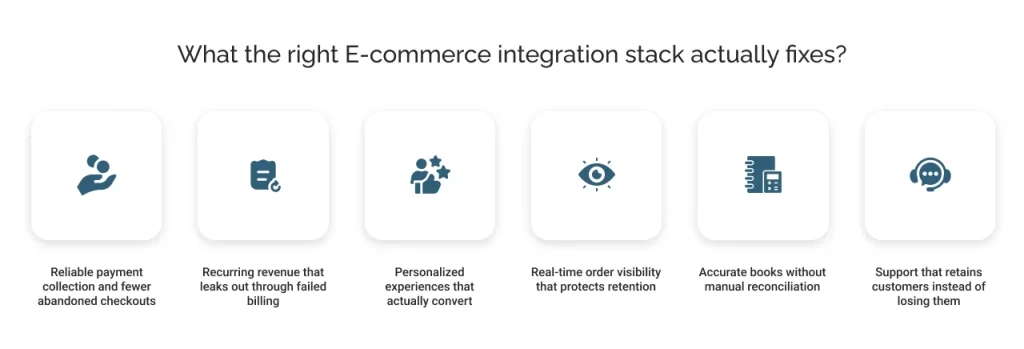
1. Reliable payment collection and fewer abandoned checkouts
A customer who reaches checkout has already decided to buy, which makes failures at this stage the costliest in the funnel.
The e-commerce industry is seeing high authorization declines from genuine customers. Baymard Institute’s research shows the average online shopping cart abandonment rate at 70.22%, meaning most online shoppers still leave before completing a purchase.
The checkout design increases this problem. The average checkout flow (as reported by Baymard) is 5.1 steps long and contains 11.3 form elements by default, and a complicated checkout process causes over 22% of shoppers to abandon their purchase.
Tools like ChargeOn and Stripe fix this by handling retries, alternate gateway routing, and keeping checkout connected to existing Salesforce data, so businesses stop losing revenue at two points they could otherwise control.
2. Recurring revenue that leaks out through failed billing
Subscription models bring a specific, recurring failure point.
A PYMNTS Intelligence report found that 40% of subscription businesses saw a rise in involuntary churn over the past year, and 79% had not applied any strategy to reduce it.
Most of this is involuntary because a card expired, and no retry was ever triggered. Chargebee and Recurly catch these failures automatically when connected to Salesforce, instead of letting them quietly erode monthly revenue.
3. Personalized experiences that actually convert
Personalization has now shifted from being a unique factor to a basic expectation.
McKinsey research shows that personalization can reduce customer acquisition costs by up to 50%, increase revenue by 5 to 15%, and increase marketing ROI by 10 to 30%.
Algolia and Nosto use Salesforce data, so their recommendation engines and search results reflect what customers actually want rather than returning generic results.
4. Real-time order visibility that protects retention
Post-purchase is where many businesses lose customers they worked hard to acquire.
The core issue is rarely a single cause: it’s delivery delays, unclear order status, and a lack of communication that push hesitant shoppers to abandon rather than wait.
When ShipStation or NetSuite is connected to Salesforce, support teams can see order status alongside the customer record, so every response is faster, and every follow-up is informed.
5. Accurate books without manual reconciliation
As order volumes grow, the gap between what the storefront records and what the accounting system shows becomes a real operational issue.
Finance teams end up reconciling revenue, refunds, and payment records manually every month, often finding mismatches between Salesforce and billing tools. An accounting integration like Sage Intacct or QuickBooks closes this gap by syncing transactions and refunds automatically, removing the manual overhead entirely.
6. Support that retains customers instead of losing them
Support teams that use tools like Zendesk and Gorgias can see order history, payment status, and prior interactions in one place and resolve issues faster and more accurately. Without this type of integration, agents work without clarity, unable to see what was ordered or whether it was paid for. This results in slow resolution, higher escalations, and forces frustrated customers toward churn.
Now that the areas of improvement are clear, the next question is which integration to start with, because not every business needs all nine at once.
How to choose the right integrations for your e-commerce business?
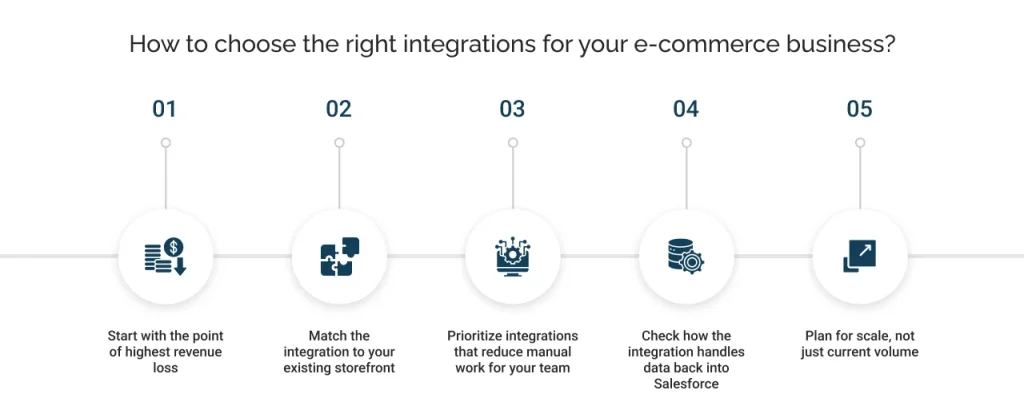
Not every business needs every integration listed above. The right starting point depends on where the current setup is causing the most friction, not on which tool is most popular.
Start with the point of highest revenue loss
Look where transactions actually fail: checkout declines, abandoned subscriptions, or unreconciled refunds. The category causing the most measurable loss should be the first integration, not the last.
Match the integration to your existing storefront
A Salesforce Commerce Cloud integration built for Shopify will not behave the same way on Magento. Confirm compatibility with your current platform before evaluating vendors within a category.
Prioritize integrations that reduce manual work for your team
If the finance team is reconciling transactions manually or the support team is switching between systems to find an order, that is a clear signal. Choose the integration that removes the most repetitive work first.
Check how the integration handles data back into Salesforce
Some tools sync one-way while others sync in real time and bi-directionally. For the best suited Salesforce e-commerce integration, transaction and customer data should flow back into Salesforce automatically, not requiring manual import.
Plan for scale, not just current volume
A tool that works well at low order volume may not hold up during peak demand. Before committing, test and check:
- If the integration has documented performance benchmarks at high volume
- How it behaves during traffic spikes like sales events or product launches
- If it has built-in failover or retry logic when the system is under load
Conclusion
A connected e-commerce stack is not about adding more tools, it is about making sure every system, from storefront to support, works off the same customer data inside Salesforce.
When payments are specifically part of that stack, a payment processing platform like ChargeOn keeps transaction data flowing back into Salesforce automatically, without adding another disconnected tool to manage.
Whichever integrations you start with, the goal stays the same: fewer manual gaps, faster resolution, and a single accurate view of every customer.