

TOC
Table of Contents
Salesforce manages your deals, customers, and revenue pipeline, yet for most businesses, the actual payment still happens outside it.
To ensure smooth transactions, your team needs to switch tabs, log into external portals, and manually update records afterwards. This results in time consumption and delays, leading to a broken customer experience.
If you start accepting payments directly inside Salesforce, then it can close this gap. Your team can connect every transaction to the right record, in real-time, without leaving the platform.
This guide covers everything you need to know about Salesforce-native payments, including different ways to accept payments, the components required, and the architecture behind secure Salesforce payment gateway integration.
Let’s get started!
What components do you need to accept payments in Salesforce?
Accepting Salesforce payments requires three components working together. Understanding each one prevents the most common implementation mistakes.
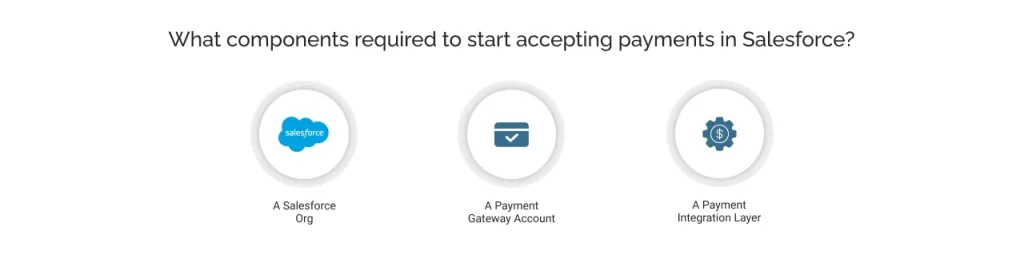
A Salesforce Org
Salesforce Org is your foundation. Salesforce does not process payments natively, but it provides the data environment, accounts, contacts, opportunities, orders, and any custom object on which a payment solution operates. Any Salesforce edition supports it, provided the right integration is in place.
A Payment Gateway account
A payment gateway is the customer-facing layer of any transaction. It securely captures the customer’s payment details, card, ACH, net banking, or wallet, encrypts them, and transmits them to the payment processor. It also handles tokenization, OTP verification, and responds with success or failure messages back to the customer.
The actual movement of money, from the customer’s bank to your merchant account, is handled by the payment processor, working in the background through card networks like Visa, Mastercard, and RuPay. The gateway and processor are two different components that work together in every transaction. The gateway securely collects the payment data, while the processor handles authorization and fund settlement.
What a native integration changes is how your payment gateway is accessed and managed, entirely within Salesforce, without switching tools. For a deeper understanding of how gateways and processors differ, refer to our detailed guide: Payment Gateway vs. Payment Processor: The Ultimate Guide.
A Payment integration layer
The payment integration layer is the connector between Salesforce and your gateway, and the component most organizations underestimate. Without it, the two systems have no way to communicate. There is no way to initiate a charge from a Salesforce record, capture the results, or automate any follow-up workflow.
Building this layer from scratch requires custom Apex development, API maintenance, and an ongoing engineering commitment. Therefore, you require a ready-made solution that can act as a connector between your platform and payment gateway.
A pre-built Salesforce-native payment solution like ChargeOn would be more feasible. It handles the integration, connecting to 16+ payment gateways, storing all data within Salesforce, and requiring no middleware or external servers.
The right integration layer transforms Salesforce from a CRM into a complete payment operations hub.
Understanding the payment flow in Salesforce
Let’s understand the process of how payment flow in Salesforce works, so that you can decide whether or not you are building the right architecture.
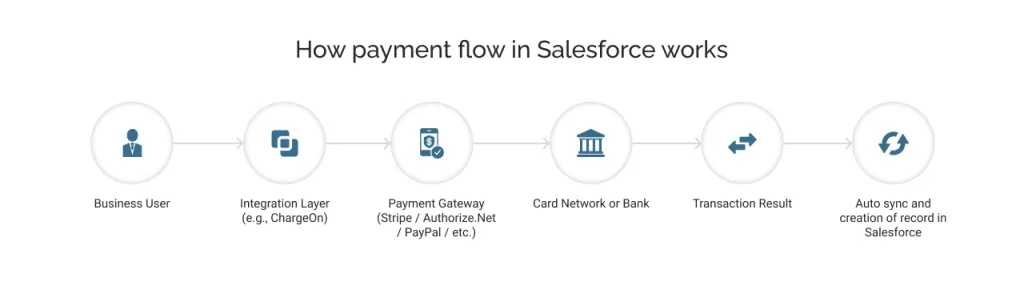
Step 1: Payment is initiated inside Salesforce
The business user triggers a payment directly from a Salesforce record. Through an Opportunity, Account, Order, or any custom object on which the solution is configured. It eliminates the need for tab switching to an external portal, as you have a centralized view in Salesforce.
Step 2: Integration layer
As ChargeOn is integrated into your Org, you can select the most relevant payment gateway and the payment method to initiate the payment. With a pre-built workflow, it routes the request to the correct gateway, manages the transaction logic, and ensures every outcome is captured back in Salesforce automatically.
Step 3: The gateway encrypts and forwards
ChargeOn communicates with the selected payment gateway including Stripe, Authorize.Net, PayPal, and others. The gateway encrypts the data using tokenization, stores the payment information in random characters, called tokens, and forwards it to the card network or bank (Visa, Mastercard, RuPay) for authorization. This is what makes the architecture PCI DSS compliant.
Step 4: Status flows back
In the post-authorization process, the response returns to the payment gateway and then to ChargeOn. This creates a Transaction History record in Salesforce, in real-time, linked to the originating object, amount, gateway, payment method, status, and timestamp. It requires no manual entry and no reconciliation lag.
Different ways to accept payments in Salesforce
A robust Salesforce-native payment solution supports multiple payment approaches. Here is an overview of each method available through ChargeOn.
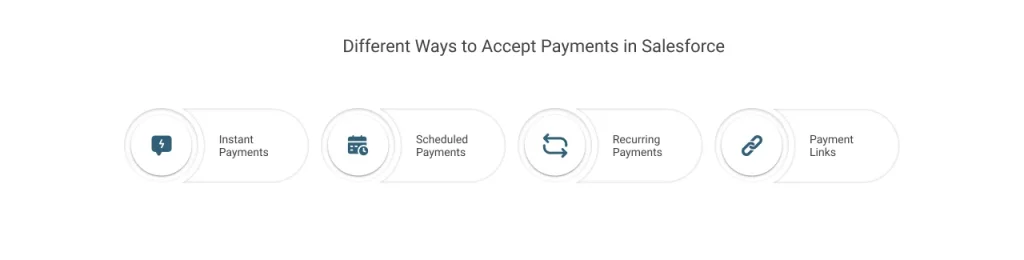
Instant Payments
Every payment type is processed in real-time, but Instant Payment is the method where the charge happens immediately, the moment the transaction is initiated. The customer’s card, ACH, bank transfer, or e-check is charged on the spot, and the transaction record is created in Salesforce within seconds. Businesses looking to improve the overall payment journey should also focus on enhancing their payment gateway experience in Salesforce.
Best for: Point-of-sale charges, one-time service fees, and immediate collections at deal close.
Scheduled Payments
Define a future charge date at setup. Payment processing platforms like ChargeOn schedule and process the payment automatically; no manual action is needed. Dates can vary per record, per customer, and can be modified or cancelled after the fact.
Best for: Net-30/Net-60 terms, milestone billing, post-delivery charges, deferred contract payments.
Recurring Payments
Automate subscription or installment billing at any frequency: weekly, biweekly, monthly, quarterly, half-yearly, or annually. Four configuration models are available: count-based, final-amount-based, end-date-based, and subscription-based. Once set up, the system handles every charge without intervention.
Best for: SaaS subscriptions, membership renewals, installment plans, long-term retainers.
Payment Links
Generate a secure, Salesforce-hosted payment link directly from a record and send it to the customer via email. The customer completes payment on a branded page without login and redirection to a third-party portal. Supports both instant and scheduled payments.
Best for: Remote collections, asynchronous billing, invoice follow-ups, and field sales scenarios.

Which approach is better: Custom build vs. Salesforce-native payment solution
When evaluating how to accept payments in Salesforce, most organizations consider two paths: building a custom integration or deploying a pre-built native application.
| Features | Custom Build | ChargeOn (Native App) |
|---|---|---|
| Deployment time | Weeks to months | Few Days |
| Gateway integrations | One at a time | 16+ integrations |
| PCI DSS compliance | Your team’s responsibility | Handled |
| Gateway fallback/routing | Custom development required | Built-in |
| Gateway fallback/routing | Custom development required | Built-in |
| Transaction history | Custom development required | Automatic |
| Multi-currency support | Custom development required | Low |
| Ongoing maintenance | High | Built-in |
| Cost | High (engineering time + resources) | From $3,500/year |
A custom build is technically feasible but carries significant time, cost, and compliance overhead. For most businesses, ChargeOn is the more practical and cost-effective path, particularly when the goal is a production-ready implementation with minimal coding.
Conclusion
Accepting payments in Salesforce is not a workaround; it is a strategic operational decision.
When Salesforce payments are processed natively, every transaction is traceable, every workflow is automatable, and your entire team works from a single source of truth.
The key is the integration layer.
A purpose-built Salesforce-native payment solution like ChargeOn removes the complexity of custom development, brings 16+ gateway integrations under one roof, and handles the compliance and automation that would otherwise fall on your internal team.
If you are ready to streamline how your business accepts, tracks, and manages payments inside Salesforce, ChargeOn is built exactly for that.
If your business runs on Salesforce, your payment operations should too.