

TOC
Table of Contents
A single payment gateway outage can stop every transaction on a Salesforce store, often without warning and even during peak sales periods. A resilient Salesforce payment gateway integration prevents this disruption. Instead of checkout failing when one gateway goes offline, transactions are automatically routed through a backup gateway, ensuring sales continue and revenue remains protected.
This blog explores why payment gateway outages occur in Salesforce e-commerce, the impact they can have on your business, and how automatic backup gateway switching helps eliminate lost sales and minimize payment disruptions.
Why do payment gateway outages happen in Salesforce E-Commerce?
Understanding why outages happen is the first step toward preventing the losses they cause. Most Salesforce e-commerce stores rely on a single connected gateway, and several distinct failure points can break that connection.
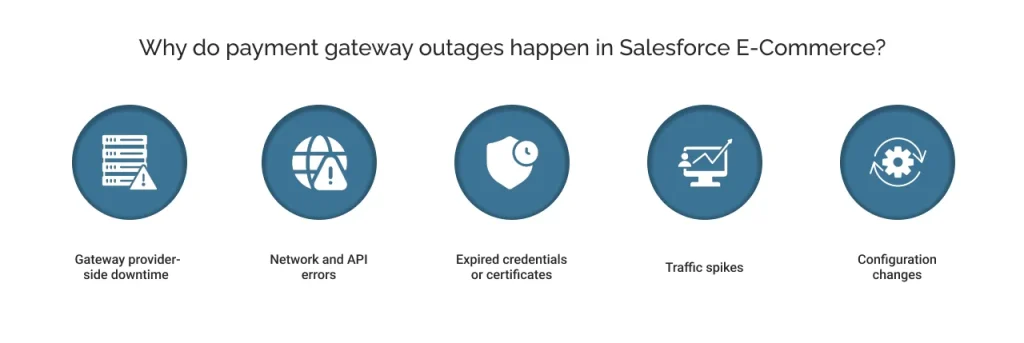
Gateway provider-side downtime
Every gateway runs scheduled maintenance windows to repair servers and roll out updates. Beyond planned maintenance, gateways occasionally experience unplanned outages due to infrastructure failures on the provider’s side. A store has no control over either event, only over how it responds when one occurs.
Network and API errors
Payment data travels between Salesforce, the gateway, and the card network through a chain of API calls. A break on any link in that chain can block a transaction. The customer sees a failure, but the root cause could sit anywhere in that chain.
Expired credentials or certificates
Gateway integrations depend on API keys, tokens, and SSL certificates that expire on a schedule. When one lapse goes unnoticed, checkout does not degrade gradually. It simply stops working, often without warning, until a customer reports the issue.
Traffic spikes
High-volume sales events push transaction volume more than expected. Gateways have processing limits, and demand during flash sales or seasonal peaks can approach those limits quickly. This is precisely when failures cost the most, since peak traffic means peak revenue at risk.
Configuration changes
A configuration update on either side of the integration, within Salesforce or at the gateway, can break a connection that worked reliably the day before. These changes often skip full testing, which quietly causes checkout failures.
None of these issues reflects a flaw in the Salesforce platform itself. They reflect the risk of depending on a single external connection for something as critical as checkout. As a result, even a well-configured store can lose consumers or revenue simply because the gateway behind it failed.
How do outages impact your business?
The causes above are technical, but the consequences land directly on revenue and customer trust. Independent data from payment providers themselves confirms the scale of this exposure.
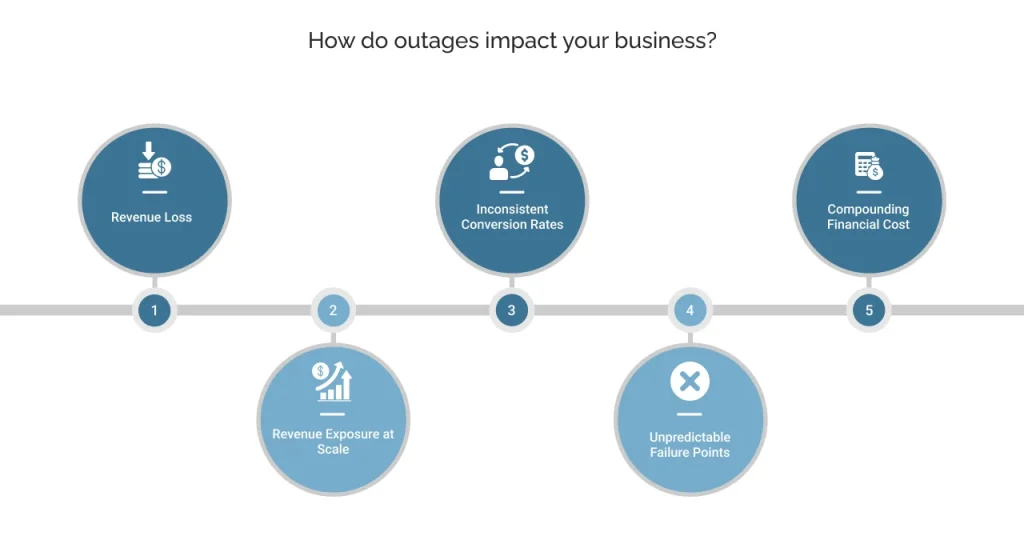
Revenue loss
Stripe reports that 33% of customers do not retry a payment when it fails at checkout, turning a technical error into an outright lost sale.
Revenue exposure at scale
As per the FF News article, 92% of enterprise e-commerce businesses experienced a payment outage or disruption within the prior two years. Half of them reported losing millions in potential revenue as a result.
Inconsistent conversion rates
Razorpay’s data shows UPI transactions succeeding at 90-95%, credit cards at 85-90%, and international cards at 70-80% due to additional verification steps. A single-gateway setup locks a business into whichever rate one gateway delivers.
Unpredictable failure points
Razorpay’s analysis notes that bank-side downtime alone can account for a significant share of failed transactions, even when the gateway reports perfect uptime.
Compounding financial cost
According to Razorpay, the average IT downtime cost is $5,600 per minute, a figure that compounds quickly during high-traffic sales windows.
Together, these numbers point to the same conclusion. Failed payments that Salesforce teams treat as isolated incidents are, in aggregate, a measurable and preventable revenue leak.
The next question is not whether outages will happen, but how quickly a business can route around them.
Two ways to handle a gateway outage
Businesses generally choose one of two paths when a primary gateway fails.
The first is manual gateway switching, where a team notices the outage and manually redirects transactions to a backup.
The second is automated backup payment gateway switching, where the system detects the failure and reroutes transactions without human intervention.
The difference between the two determines how much revenue survives an outage.
| Factor | Manual Switching | Automated Backup Switching |
|---|---|---|
| Detection time | Depends on the team to notice the failure | Detected within seconds through health monitoring |
| Response time | Minutes to hours, based on availability | Milliseconds before the customer notices |
| Customer experience | Checkout error is visible during the gap | Failure is invisible to the customer |
| Coverage during peak traffic | Unreliable, teams are often stretched thin | Consistent regardless of transaction volume |
| Human effort required | Constant monitoring and manual action | None, once configured |
| Risk of missed transactions | High, especially outside business hours | Low, monitoring runs continuously |
As we gathered from the table, manual switching depends on a person being available at the exact moment a gateway fails, which rarely happens during off-hours or peak sales windows. Automated switching removes that dependency entirely.
For any Salesforce e-commerce store that cannot afford a gap between failure and response, automated backup gateway switching is the only approach that scales.
How can ChargeOn’s automated backup payment gateway switching help?
Automated switching is the clear winner, and this is exactly what ChargeOn’s Gateway Fallback Mechanism delivers inside Salesforce. It is ChargeOn’s primary differentiator, designed to prevent revenue loss the moment a gateway fails.
ChargeOn sits between Salesforce and the connected gateway, orchestrating the flow instead of moving money itself. When a card transaction fails through the primary gateway, ChargeOn does not surface an error to the customer. It responds through the following sequence:
- Detection: ChargeOn identifies a failed transaction at the primary gateway in real time.
- Priority-based retry: The transaction is automatically retried through the next gateway in a pre-configured priority chain. Businesses can chain up to three fallback gateways, and the main and secondary workflows can be customized to match specific routing needs.
- Tokenization reuse: ChargeOn uses tokenization to securely reuse stored card details across the fallback chain, so the customer never re-enters payment information. Customers are registered across all fallback-enabled gateways in advance, which keeps this step instant.
- Invisible customer experience: The retry and gateway switch happen behind the scenes. The customer sees a completed transaction, not a failure followed by a retry.
This process works for both one-time and recurring card payments, so a failed subscription renewal is protected in the same way as a single checkout transaction. ChargeOn operates as a Salesforce payment orchestration layer rather than a replacement for any gateway.
It distinguishes correctly between payment gateways, which capture and transmit data, and payment processors, which move the funds. The fallback chain sits at the orchestration layer, coordinating across whichever gateways and processors a business already uses.
The result is a checkout flow that stays operational throughout outages that would otherwise stop transactions entirely, without adding manual work for any team.