

TOC
Table of Contents
Running a fintech business on Salesforce means handling more than just customer relationships. Your team manages billing, compliance checks, scheduling, contracts, and accounting, often across tools that were never built to talk to each other.
Salesforce gives fintech companies a strong CRM foundation. However, the platform alone does not cover the full range of operational needs fintech businesses have, from identity verification at onboarding to accounting that stays in sync with your sales data. That is where the AgentExchange (AppExchange) marketplace steps in.
The apps available on AgentExchange close exactly those gaps. They extend Salesforce’s native capabilities into a complete financial operations platform.
The right Salesforce native app transforms how your finance, sales, and operations teams work without stepping outside Salesforce.
In this blog, we have evaluated the best Salesforce apps for fintech companies, so you can make the right call for your business.
Best Salesforce AgentExchange apps for fintech companies
Fintech companies need more than a single tool to run their operations smoothly. The apps below extend Salesforce’s built-in capabilities across the full range of needs a fintech business has, from payments and accounting to compliance and customer engagement.
Each listing covers what the app does, its key features, who it suits best, whether it is Salesforce native, and its pricing model.
1. ChargeOn
ChargeOn is a 100% Salesforce native payment processing and orchestration platform built by Cyntexa. It connects Salesforce to 19+ payment gateways and manages the entire payment lifecycle from instant and recurring billing to automated collections. It offers intelligent gateway routing without middleware or custom development.
For fintech companies that process payments at volume across multiple gateways and regions, ChargeOn removes the need for custom development or external middleware. It is best suited for businesses that need recurring billing, automated collections, and gateway reliability built natively into Salesforce.
Key features:
- Multiple payment gateway integrations, including Stripe, Authorize.Net, PayPal, Razorpay, and Adyen.
- Instant, scheduled, and recurring payments with four recurring configuration models.
- Gateway Fallback Mechanism for automatic retry through up to three backup gateways.
- PCI DSS compliant and tokenization for repeat transactions.
- Automated Collections for reminders, retries, and dunning workflows.
- Payment links with reCAPTCHA fraud protection.
- Multi-currency support across 0, 2, and 3 decimal currencies.
- Fully automated pre-charge notifications, expiry alerts, and payment receipts.
- Real-time Transaction History inside Salesforce, linked to any standard or custom object.
- Salesforce Invoicing, surcharging, error logs, and unresolved transaction management.
- Payment in Salesforce Experience Cloud.
2. QuickBooks Integration for Salesforce (by DBSync)
DBSync provides a no-code, bi-directional integration between Salesforce and QuickBooks (Online or Desktop). QuickBooks Integration for Salesforce eliminates manual data entry between your CRM and accounting system.
When a Salesforce Opportunity is marked “Closed Won,” DBSync automatically generates the corresponding invoice, sales order, or estimate in QuickBooks. This results in aligned financial and customer data across both platforms.
Therefore, it is a preferable choice for fintech companies running sales and accounting on separate systems.
Key features:
- Bi-directional sync between Salesforce and QuickBooks Online/Desktop.
- Automatic invoice, sales order, and estimate generation on Closed Won Opportunities.
- Syncs customers, products, price books, and payment statuses across both systems
- Supports complete and systematic coordination.
- No-code, drag-and-drop workflow templates, deployable in hours, not weeks.
- Adaptable to other Force.com apps for a unified integration hub.
- Compatible with Salesforce Unlimited, Professional, Enterprise, and Non-Profit editions.
3. LASER Credit Access
LASER Credit Access brings real-time credit, income, and banking data from major credit reporting agencies directly into Salesforce records.
Built specifically for lenders and financial institutions, it replaces manual credit pulls and disconnected underwriting tools with a single, native Salesforce workflow. LASER handles everything from credit retrieval to compliant decisioning.
For fintech companies in the loan lending business, this is one of the more specialized but critical tools on this list. It turns compliance and underwriting from a manual process into an automated background process.
Key features:
- Real-time credit report access from Experian, TransUnion, Equifax, and nearly 40 other credit reporting agencies.
- Automated underwriting rules engine ensures identical loans are scored identically.
- Built-in compliance coverage for FCRA, ECOA, GLBA, AML, and KYC.
- Audit-ready, continuous compliance tracking.
4. GoCloudz CPQ
GoCloudz CPQ is a 100% Salesforce-native Configure, Price, Quote (CPQ) solution. It simplifies complex pricing and product bundling directly inside Salesforce. However, it generates accurate quotes, proposals, and invoices without the implementation complexity of Salesforce CPQ.
For fintech companies managing tiered pricing, volume discounts, and multi-currency product configurations, GoCloudz removes the manual effort from quote-to-cash workflows.
Key features:
- Product bundling with volume, attribute, and tiered pricing.
- Dynamic quote, proposal, and invoice generation on Opportunities, Quotes, and Orders.
- PDF Generator: fully branded document output with DocuSign integration.
- Order and Renewal Management: automates order creation and renewal cycles.
- Multi-currency support across bundles and pricing rules.
- Compatible with any third-party payment processing app inside Salesforce.
- No-code configuration with a drag-and-drop interface.
- Works across Salesforce Classic and Lightning.
5. Engageware Scheduler for Salesforce
Engageware Scheduler is an enterprise-grade appointment scheduling solution built for regulated industries, particularly banking, financial services, and insurance. It enables advisors and relationship managers to schedule, route, and manage appointments directly from Salesforce records.
Appointment-based engagement includes advisory calls, loan consultations, and account reviews, which are part of the customer journey. So, for fintech companies where the workflow is based on engagement, Engageware removes the friction of disconnected calendar tools and manual coordination.
Key features:
- Native Salesforce scheduling, no external tabs, logins, or sync tools required.
- Skill-based and territory-based appointment routing across thousands of advisors.
- Multi-participant and multi-location appointment coordination.
- Native integration with Outlook, Microsoft Teams, Zoom, and Webex with real-time calendar sync.
- SMS and email reminders to reduce no shows.
- Built on Salesforce Flow Builder for custom workflow automation.
- Enterprise-grade security and compliance for regulated industries.
6. Sage Intacct Accounting and ERP
Sage Intacct connects Salesforce to a full-featured cloud accounting and ERP system, enabling end-to-end quote-to-cash automation.
Once a deal is closed in Salesforce, contracts, orders, and projects can be sent into Sage Intacct with a single click. Moreover, it automatically triggers invoicing and revenue recognition without manual retyping.
For fintech companies that need deep accounting and financial reporting beyond what Salesforce natively offers, Sage Intacct is one of the more comprehensive options.
Key features:
- Send Salesforce contracts, orders, and projects into Sage Intacct automatically on save or in batch
- Automatic invoicing and revenue recognition are triggered from Salesforce records.
- Real-time visibility into customer and transaction data for finance teams.
- Salesforce Chatter is embedded directly inside Sage Intacct for cross-team collaboration.
- No scripting or third-party services required for standard configuration.
- Works with Salesforce Classic, Lightning, and the Salesforce mobile app.
- Available for Enterprise, Unlimited, and Performance editions of Salesforce.
7. DocuSign eSignature for Salesforce
DocuSign eSignature for Salesforce is the most downloaded electronic signature application on the AppExchange. It covers the full agreement lifecycle, sending, signing, tracking, and storing directly inside Salesforce. Sales, operations, and compliance teams can manage contracts, disclosures, and onboarding documents without leaving the platform.
DocuSign has a user base of over 1 billion signers globally and 700,000+ customers across regulated industries.
For fintech companies in regulated environments, DocuSign’s audit trails, encryption, and compliance-ready workflows make it one of the standard choices for handling agreements that require legal work and a verifiable signing record.
Key features:
- Send, sign, track, and store agreements natively inside Salesforce records.
- AES 256-bit encryption with tamper-evident seals and complete audit trails
- Bulk sending of envelopes useful for policy renewals and compliance disclosures at scale.
- DocuSign Gen add-on for automated document generation from Salesforce CPQ and Subscription Management data.
- Native AppExchange installation with a guided setup wizard.
- Supports HIPAA Business Associate Agreements on higher-tier plans, relevant for fintechs operating in healthcare-adjacent spaces.
8. Accounting Seed: Accounting on Salesforce
Accounting Seed is a fully native accounting solution built directly on the Salesforce platform, meaning no integration or syncing is required between your CRM and your books. Sales, finance, and operations all share the same database, so data moves from opportunity to invoice to cash without ever leaving Salesforce.
For fintech companies that want accounting tightly aligned with operational data, this native-first approach removes a category of problems that connector-based tools can run into.
Key features:
- Runs entirely inside Salesforce and shares the same database as your CRM, with no sync or integration layer.
- AI-powered AR and AP automation flags duplicate payables, answers natural-language queries on journal entries, and predicts payment timing based on customer patterns.
- General ledger, accounts payable, accounts receivable, and project accounting in one platform.
- Multi-book accounting helps deliver both GAAP- and cash-based financials.
- Multi-entity and multi-currency support for businesses operating across regions.
- Native connectors for Sales Cloud, Revenue Cloud, Service Cloud, NPSP, and Field Service Management.
- Customizable workflows, data fields, and reports without custom development.
- Recurring billing and automated invoice generation.
9. JustOn Billing and Invoice Management
JustOn is a Salesforce-native billing and invoice management platform that automates the full order-to-cash cycle. Built entirely on Force.com, it keeps billing data, customer records, and contract terms aligned within Salesforce without requiring a separate billing system.
For fintech companies managing high-volume subscription billing, usage-based charges, and multi-entity operations, JustOn brings the entire billing workflow into one connected environment.
Key features:
- Automated invoice generation from contracts, orders, subscriptions, or custom objects.
- Subscription and recurring billing with usage-based pricing support.
- Multiple pricing models: tiered, volume, flat rate, and instalment-based.
- E-invoicing and branded invoice document output.
- Accounts receivable management, invoice runs, status tracking, and dunning workflows.
- Multi-tenant support: bill from multiple business entities within one Salesforce Org.
- Revenue reporting is built on live Salesforce data.
- Integrates easily with accounting systems like Sage, DATEV, or SAP.
- No middleware, as all data stays within Salesforce.
10. Yoti IDV & KYC
Yoti IDV & KYC brings identity verification and Know Your Customer (KYC) checks directly into Salesforce, powered by Agentforce. Businesses can initiate an identity check from within Salesforce, and the verification results are extracted from ID documents and selfie biometrics. The result flows straight back into the Salesforce dashboard, removing the need to manually handle or store physical documents.
Customer onboarding in financial services almost always requires identity verification, and doing it natively inside Salesforce. It means compliance teams are not switching between systems to confirm who they are doing business with.
Key features:
- AI-powered identity verification using OCR data extraction from ID documents across 200+ countries.
- Selfie biometric matching to confirm identity at onboarding.
- Agentforce-powered businesses can request and manage IDV/KYC checks using natural language.
- Results stored directly within Salesforce for centralized compliance reporting.
- ISO/IEC 27001:2013 and SOC 2 Type 2 certified for data protection.
- No need to physically handle or store identity documents.
- Custom workflow creation while keeping customer data within your own Salesforce environment.
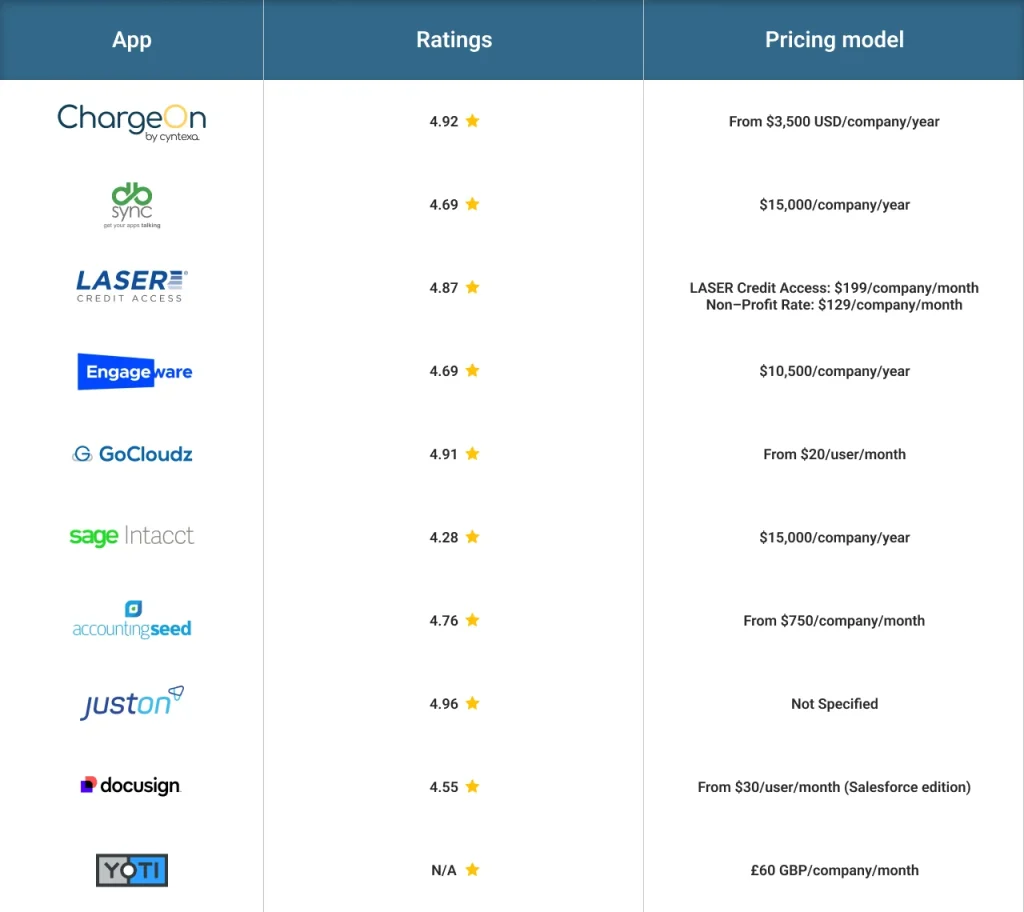
Each app approaches fintech payment operations from a different angle. Here is a side-by-side view to help you compare at a glance:
| App | Ratings | Pricing model |
|---|---|---|
| ChargeOn | 4.95 | From $3,500 USD/company/year |
| QuickBooks(DBSync) | 4.69 | $15,000/company/year |
| LASER Credit Access | 4.87 | LASER Credit Access: $199/company/month |
| Engageware Scheduler | 4.69 | $10,500/company/year |
| GoCloudz CPQ | 4.91 | From $20/user/month |
| Sage Intacct | 4.28 | $15,000/company/year |
| Accounting Seed | 4.76 | From $750/company/month |
| JustOn | 4.96 | Not Specified |
| DocuSign eSignature | 4.55 | From $30/user/month (Salesforce edition) |
| Yoti IDV & KYC | NA | £60 GBP/company/month |
How to choose the right Salesforce AgentExchange apps for your fintech business?
With 10 apps covering payments, accounting, credit, scheduling, e-signature, and identity verification, this is not a single-winner decision. Most fintech businesses end up using a combination of these apps, each solving a different part of the operation. The goal is to identify which functionality needs to be improved for your business, then pick the right app for each one. Work through these four steps to get there.
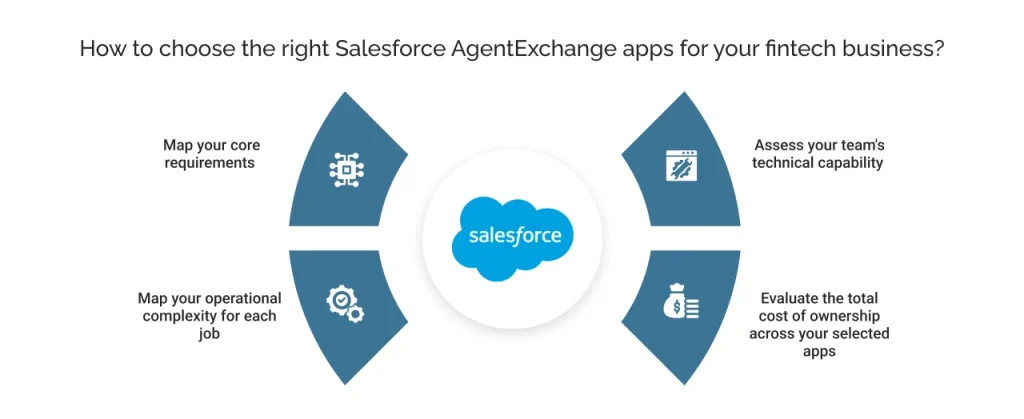
Step 1: Map your core requirements
Rather than asking “which one app should I pick,” start by listing out every part of your fintech operation that currently feels manual or disconnected.
- Is our accepting payment and reconciliation process running efficiently?
- Are your books out of sync with your CRM?
- Is credit decisioning, customer scheduling, contract signing, or identity verification at onboarding still a manual process?
You may find more than one answer applies to your business. That is expected, each of these is a separate job, and each one on this list is built to solve a specific one. There is no restriction that you can only use one app from this list.
Step 2: Map your operational complexity for each job
For each requirement from Step 1, think about how complex that specific task really is. A business handling simple one-time payments needs a much simpler setup than one managing multiple gateways across different currencies and regions.
Similarly, a lender doing manual credit checks has very different needs from one running automated underwriting at scale. Match each app to how complex your actual workflow is, not to whichever app has the most features.
Step 3: Assess your team’s technical capability
Some apps on this list, like Sage Intacct’s connector-based architecture, offer deep customization but require technical resources to configure and maintain. Others are no-code and deployable by business users directly.
Before deciding, sit down with your business teams and understand their actual pain points. The people using these tools daily often know exactly where the friction is, and that conversation will tell you far more than a feature comparison ever could.
As you bring together multiple apps to cover different tasks, be honest about what your team can realistically support across all of them, long after implementation.
Step 4: Evaluate the total cost of ownership across your selected apps
Licence cost is only one part of the equation for each app you choose. It factors into implementation time, ongoing maintenance, and whether the app needs additional development resources to stay useful.
As you combine multiple apps, the overall ownership increases. An app with low cost but high setup complexity can end up costing more than an expensive app with guided onboarding and dedicated support.
Work through these four steps for each workflow your fintech business needs to streamline, and the right combination of apps becomes clear.
Not because any one of them has the longest feature list, but because together they solve the specific gaps your business has today.
Every app on this list extends Salesforce into a part of fintech operations the platform does not natively cover, from payments to accounting to compliance. The right combination depends on where your business feels the most friction today.