
TOC
Table of Contents
Salesforce payment solutions help businesses accept and manage payments while keeping transaction data connected to their Salesforce records. The right solution depends on the payment gateways and methods you need, your billing workflows, the Salesforce products you use, and how much payment automation your team requires.
ChargeOn by Cyntexa is a Salesforce-native payment solution designed for businesses that need payment collection, recurring and scheduled payments, multi-gateway support, automated payment workflows and more. Other solutions may also be a better fit for requirements such as invoice-focused billing, regional European payment methods, event-related payments, or specific Salesforce Billing workflows.
In this guide, we compare six Salesforce payment solutions Kulturra, ChargeOn, Chargent, FinDock, Blackthorn, and Unaric Payments across their features, payment methods, recurring billing, payment links, security approaches, automation, pricing, and key use cases. Use the comparison to identify which products merit a closer evaluation for your organization.
Best Salesforce payment solutions available on AgentExchange
Here is a brief overview of various Salesforce-native payment apps that you can go through.
1. Kulturra
Kulturra is a Salesforce payment processing app suitable for a wide range of industries and businesses of all sizes. Founded in 2012 by Kulturra.com Inc., the company is headquartered in Torrance, California.
Number of payment gateways supported: 120+
Features include:
- Credit card and ACH payments
- Invoicing
- Subscription and recurring payments
- Point of sale (POS)
- Payment reminders
- Revenue reporting
Kulturra focuses on invoicing-led payment collection. The invoices are customizable and created inside Salesforce, then sent directly to customers for online payment. The entire billing cycle can be managed without leaving the CRM, while customers view and pay independently in Experience Cloud.
AppExchange rating: 4.98
2. ChargeOn
ChargeOn by Cyntexa is one of the best Salesforce payment processing apps nowadays, supporting use cases across all industries. It is the first application supported by advanced Agentforce capabilities.
Number of payment gateways supported: 20+ globally
Features include:
- Support for credit card, debit card, and ACH/Bank/E-check payments, as well as payment links
- Instant, scheduled, and recurring payments
- Payment links
- Agentforce capabilities for collecting payments, managing authorizations, processing refunds, and conducting lookups
- Headless 360 enabled to connect to AI models
- Offline payment recording for cash, check, and bank wire transactions
- Payment orchestration with fallback mechanisms for payment gateways and methods
- Invoicing
- Automated collections (point and click)
- Multi-currency support with Dynamic Currency Conversion (DCC)
- Authorization hold
- Tokenization and PCI-DSS compliance
- Reports and dashboards
- Real-time payment notifications
- Full and partial refunds with note captures
- Transaction history, error logs, and notifications
- Upfront installment and advance payments
- Surcharging calculation
- Credit memo offering
- 3D Secure card enablement
- Global settings
- Gateway fallback mechanism
- Self-service payments in Salesforce Experience Cloud
The primary function of ChargeOn is to facilitate payment processing and orchestration. It sits between Salesforce and connected payment gateways, intelligently routing transactions and feeding data back into Salesforce records in real time.
ChargeOn also offers automated workflows. Unlike standard payment connectors, it maps to any Salesforce object, standard or custom, at no additional connector cost.
Along with this, you get natural language prompting that helps collect, manage, authorize, refund, and look up payments directly.
The configurations, business rules, payment gateway settings, security settings, and diagnostic controls all live in a unified interface, reducing the need to navigate multiple records and setup pages.
ChargeOn also includes Headless360, an orchestration layer built on Agentforce that extends beyond it, with advanced dashboard generation, deeper data drill-down, and richer analytics than stock Agentforce provides.
AppExchange rating: 4.95
3. Chargent
Chargent is another Salesforce payments processing platform, built by AppFrontier LLC and headquartered in San Francisco, CA. It first launched on the Salesforce AppExchange in 2008.
Number of payment gateways supported: 30+
Features include:
- Credit card and ACH/bank account payments
- Recurring billing and subscription payments
- Automated Collections
- Card surcharging
- Payment Request
- Payment Console
- Self-service payments in Experience Cloud
- Saved Payment Methods
- Add Cash / Add Check
- Account Updater
- Payment Status Viewer
- Transaction Sync for ACH
- Chargent Terminal (a separate physical POS app)
- Unresolved Transactions tab
- Tokenization and PCI compliance
- Reports and dashboards
- REST API and developer tools
The primary function of Chargent is to process payments directly in Salesforce, where customer data already lives. This offers complete visibility, streamlined revenue collection, and improved data security.
Its flagship feature, Chargent Anywhere, is a Lightning Web Component that payment-enables any object in a Salesforce org with clicks, not code. It also integrates directly with InterPayments for surcharging.
Chargent is well-suited for teams running Salesforce CPQ and Billing, and serves industries including nonprofits, technology and SaaS, finance and insurance, manufacturing, healthcare, and travel and hospitality.
AppExchange rating: 4.93
4. FinDock
FinDock is a payment management application founded in 2014 by FinDock, headquartered in Woerden, Netherlands. It is trusted by customers across the globe and across varied industries.
Number of payment gateways supported: 19+, with a wide range of global and local PSPs
Features include:
- Online and offline payment processing platform, including credit and debit cards, bank transfers, and digital wallets
- PayLinks: customizable payment URLs generated directly within Salesforce for one-time payments and payment recovery
- Giving Pages and Payment API for custom payment flows
- Recurring and subscription payment automation
- Virtual Terminal for phone, mail order, and call center payments
- Outbound payments for vendor disbursements, grant payouts, and reimbursements
- Failed payment recovery and automated retry workflows
- Guided Matching for bank statement reconciliation directly in Salesforce
- Payment analytics and reporting through Salesforce reports, dashboards, and third-party tools
- Native integration with Salesforce Nonprofit Cloud (NPC) and NPSP
FinDock offers overall payment management inside Salesforce, through automated workflows that eliminate manual work and fragmented integrations.
It suits businesses that need regional and local payment method support across Europe, with native coverage for iDEAL, Bancontact, Sofort, Tikkie, MobilePay, and Swish alongside global card and direct debit schemes.
AppExchange rating: 4.98
5. Blackthorn
Blackthorn was founded in 2015 by Blackthorn.io, Inc., headquartered in New York. It started with Salesforce payment processing as its first product, later expanding into event management, text messaging, and data compliance.
Number of payment gateways supported: 120+
Features include:
- PCI-compliant credit card and ACH payments
- Apple Pay and Google Pay
- One-time and recurring payments
- Automated payment scheduling
- PayLink (payment links sent via email, SMS, or any channel)
- Virtual Terminal for phone and back-office payments
- DocumentLink for web-based invoicing
- Mobile payments via iOS and Android apps with Bluetooth card readers, EMV certified and compatible with Salesforce Field Service Lightning
- Self-service payments in Salesforce Experience Cloud
- Check scanning and processing
- Stripe Checkout and Stripe Connect support
- Multi-currency support
- Tokenization and PCI compliance
- Reports, dashboards, and real-time transaction reconciliation
- REST and Apex API for custom integrations
Blackthorn’s suite of Salesforce native apps helps companies use existing data to create more personalized events and track results precisely, serving higher education, nonprofits, healthcare, and beyond.
Blackthorn Payments enables transactions online, via mobile, and through Salesforce Field Service, syncing payment data with other Salesforce records in real time.
AppExchange rating: 4.97
6. Unaric Payments
Unaric Payments is a Salesforce-native payment orchestration application built by Unaric, headquartered in London, UK. The product was originally developed as Asperato and was acquired by Unaric in March 2024, after which it was rebranded.
Number of payment gateways/PSPs supported: 20+
Features include:
- Credit/debit cards, digital wallets, APMs, and bank-to-bank transfers, including ACH/eCheck and direct debit
- One-time and recurring payments via Payment Schedules
- Payment links and branded PayPages for online and email-based payment collection
- Payment console for phone/back-office payments
- Outbound payments to vendors directly from Salesforce
- Smart retry logic for failed direct debits
- Multi-entity payment collection from a single Salesforce environment
- Multi-language support out of the box
- PCI-DSS, tokenization
- Reports and dashboards for transaction metrics and cash flow
- Compatible with multiple Salesforce clouds or custom objects
Unaric Payments integrates with Salesforce via a single no-code managed package, with no APIs to write or manage. It is compatible with Revenue Cloud, Sales Cloud, Experience Cloud, and Field Service Lightning.
Its primary use cases span real estate, financial services, high-tech, SaaS, and automotive industries.
AppExchange rating: 4.78
With a working sense of what each app offers individually, the next step is seeing how they stack up side by side on the common features most businesses evaluate first.
Feature-by-feature comparison of what each Salesforce payment processing apps offers
The tables below compare the six solutions across payment methods, recurring billing, payment links, invoicing, security, authorization, notifications, reporting, payment recovery, and Salesforce compatibility.
A listed capability does not necessarily mean it is included in every plan or available with every gateway. Where a feature depends on a payment provider, Salesforce product, add-on, or configuration, that dependency should be noted.
Note: All feature data was sourced directly from official product documentation, AgentExchange listings, and verified user reviews on G2 and AgentExchange.
Credit / debit card payments
Every app in this comparison processes card payments, but where and how customers pay varies, from web and mobile checkout to in-person POS.
| App | Card Payment Support |
|---|---|
| ChargeOn | Credit and debit cards via Instant, Scheduled, and Recurring methods, and payment links |
| Chargent | Credit and debit cards, explicitly supporting Visa, Mastercard, Amex, Discover |
| Kulturra | Credit and debit cards via web, mobile, and POS |
| Blackthorn | Credit and debit cards online, via mobile app, and in Experience Cloud |
| FinDock | Depends on the connected PSP or gateway |
| Unaric Payments | Credit and debit cards via PayPage, payment console, and payment links |
ACH / bank / direct debit payments
Bank-based payments matter most for recurring billing and lower processing costs, but coverage here varies significantly by region, since each country runs its own bank transfer network and an app only supports the ones it’s built to connect with.
| App | ACH / Bank Payment Support |
|---|---|
| ChargeOn | ACH, BECS, SEPA and E-check across Instant, Scheduled, and Recurring |
| Chargent | ACH, EFT, BECS, SEPA across multiple bank draft networks |
| Kulturra | ACH alongside card payments |
| Blackthorn | ACH via Stripe and Authorize.net |
| FinDock | SEPA, BACS, SEDA, CH-DD, LSV+ direct debit schemes |
| Unaric Payments | ACH/eCheck and bank-to-bank transfers via GoCardless and others |
Recurring and subscription payments
All six apps support recurring billing, but the flexibility of how a recurring cycle is structured differs.
| App | Recurring Payment Approach |
|---|---|
| ChargeOn | 4 recurring bases (Count, Final Amount, End Date, Subscription), 6 frequency options from Weekly to Yearly |
| Chargent | Customizable billing frequency, with a terminate option and customer self-update of billing info |
| Kulturra | Recurring invoices and subscriptions, with schedules from daily to multi-year |
| Blackthorn | One-time and recurring via Stripe Billing, Authorize.net, and PayPal, with automated scheduling |
| FinDock | Recurring payments, donations, and memberships managed directly in Salesforce |
| Unaric Payments | Recurring via a Payment Schedule object, with customizable amount, frequency, and due dates |
Payment links
Businesses can collect payment in Salesforce using payment links without a full checkout flow. It is useful for invoices, one-off requests, or phone-based sales.
| App | Payment Link Capability |
|---|---|
| ChargeOn | Generate Payment Link, supporting Card, ACH, and E-check for Instant and Scheduled payments |
| Chargent | Payment Request, sent via email, supporting card and ACH |
| Kulturra | Payment Request Link, allowing customers to pay online directly |
| Blackthorn | PayLink, unique per transaction, emailed or embedded in Opportunity fields |
| FinDock | FinDock PayLinks, unique customizable URLs for one-time payments and recovery |
| Unaric Payments | PayPage / PayLink, branded and embeddable in emails, invoices, or portals, supporting card and direct debit |
Invoicing Capability
Invoicing is worth discussing separately, particularly for businesses weighing Kulturra against ChargeOn, since the two take noticeably different approaches to it.
| App | Invoicing Approach |
|---|---|
| ChargeOn | Invoicing included as part of a broader payment orchestration platform, rather than a dedicated invoice-first workflow |
| Chargent | No dedicated Invoice object with status tracking (Due, Paid, Partial, Overdue) documented publicly |
| Kulturra | Fully customizable invoice templates supporting discounts, shipping, taxes, surcharges, down payments, and multiple installments.Opportunities, Quotes, and Orders convert directly into invoices |
| Blackthorn | Invoice fields tied to the Transaction object (Write Off Amount, Balance Paid, Balance Due).Functions as transaction-linked invoicing rather than a standalone invoice object. |
| FinDock | Works through Installments within its NPSP and donation data model, suited to nonprofit billing rather than general invoicing. |
For businesses where invoicing is the primary requirement, Kulturra is the closest fit. For businesses prioritizing broader payment collection and orchestration with invoicing as one feature among several, the other apps remain viable options.
Tokenization and PCI compliance
Tokenization determines whether raw card data changes into tokens, which matters for both security posture and PCI scope.
| App | Tokenization Approach |
|---|---|
| ChargeOn | Native tokenization; PCI-DSS compliant Includes Expired Card Notifier and Account Payment Method Update Email |
| Chargent | Native tokenization; PCI-DSS compliant Transaction record stores the token, not the card |
| Kulturra | Processor-side tokenization for cards and bank accounts |
| Blackthorn | PSP-side tokenization via Stripe or Authorize.net; card data never stored in Salesforce |
| FinDock | PSP-side tokenization, dependent on the connected payment provider |
| Unaric Payments | PCI-DSS Level 1 certified; tokenization via connected PSP; no sensitive card data stored in Salesforce |
ChargeOn and Chargent both tokenize natively within their own architecture, while Kulturra, Blackthorn, FinDock, and Unaric Payments rely on the connected processor to handle tokenization. Both approaches meet PCI compliance requirements, but native tokenization gives a business one less dependency on a specific processor’s tokenization behavior. For a deeper look at how tokenization protects stored payment data, see our breakdown of the benefits of tokenization.
Authorization hold and register token
An authorization hold checks if a card is valid or reserves funds for a future charge, without completing the transaction immediately. A related but distinct capability, sometimes called Register Token, verifies a card without placing any hold on funds.
| App | Authorization Hold | Register Token / Card Verification |
|---|---|---|
| ChargeOn | Yes, card-only; not available for ACH/eCheck or recurring charges | Supported as part of its tokenization flow |
| Chargent | Yes, via Payment Request, Payment Console, or API; card-only, same restriction as ChargeOn | Yes, a $0 authorization for Visa, Mastercard, or Discover verifies a card without a hold; shown as a “Register Token” transaction type |
| Kulturra | Yes, cards can be authorized, captured, voided, or refunded directly in Salesforce | Tokenizes at the point of adding a payment method; no distinct Register Token flow documented |
| Blackthorn | Yes, via the Transaction object; partial captures on authorized transactions supported | Tokenizes at the point of adding a payment method; no distinct Register Token flow documented |
| FinDock | Not clearly documented as a standalone authorization hold feature | Not documented as a distinct flow |
ChargeOn and Chargent are the only two apps in this comparison with an explicit, named Register Token flow, separate from a standard authorization. FinDock’s focus leans more toward reconciliation and matching than card authorization, which is worth noting as a gap if authorization hold is a requirement.
Real-time notifications
Notifications determine how quickly a team learns about a problem, whether it’s a failed charge, an expiring card, or a stalled transaction.
| App | Notification Coverage |
|---|---|
| ChargeOn | Alerts for card expiry, payment failure, payment success, and retry, delivered in Salesforce and via email |
| Chargent | Granular alerts that are real-time notifications for specific payment events, covering transaction status changes, unresolved transactions, payment requests, Account Updater activity, recurring billing events, ACH returns, and CTI call center pause/resume |
| Kulturra | Reminders for auto-retry jobs, transaction status, and overdue invoices or expiring cards |
| Blackthorn | PayLink failure alerts, with transaction status updates on the same record |
| FinDock | Immediate status updates for online payments and PayLinks |
| Unaric Payments | Live notifications and alerts for payment failures, built to pinpoint issues quickly |
Chargent offers granularity here, largely because of its CTI integration, while ChargeOn’s coverage stays focused on the events most directly tied to revenue: expiry, failure, success, and retry.
Reports and dashboards
Reporting determines how easily a finance or operations team can see what’s actually happening across payment gateways, without exporting data elsewhere.
| App | Reporting Capability |
|---|---|
| ChargeOn | Custom reports per gateway, per payment method, and per customer, with charts built inside Salesforce |
| Chargent | Dynamic reports and dashboards, natively in Salesforce |
| Kulturra | Customizable dashboards for sales, payments, and revenue |
| Blackthorn | Reports and dashboards with AI-based insights and real-time transaction visibility |
| FinDock | Reporting and analytics through Salesforce reports and dashboards, compatible with third-party tools |
| Unaric Payments | Prebuilt reports and dashboards for transaction metrics and cash flow, monitoring across all connected PSPs in one place |
All six apps keep reporting inside Salesforce payment processing workflows rather than requiring a separate analytics tool. However, the depth of segmentation, whether by gateway, method, or customer, is different for ChargeOn compared to others.
Automated collections and failed payment recovery
This is where a failed payment either gets resolved automatically or becomes manual cleanup work. It’s one of the most significant on this list.
| App | Recovery Approach |
|---|---|
| ChargeOn | Built-in, point-and-click configuration; multi-stage workflows with reminder emails, payment link resends, and automatic retry |
| Chargent | Automated Collections module, available as a Growth/Enterprise add-on |
| Kulturra | Automatic retries for failed payments, with reminders for overdue invoices and expiring cards |
| Blackthorn | Automation focused on reconciliation, with simple re-attempts on the same gateway |
| FinDock | Automated payment schedules, recovery flows, and reconciliation across processors |
| Unaric Payments | AI-powered smart retry through GoCardless Success+, finding the optimal retry time for failed direct debits |
Chargent and Blackthorn both continue to retry the same gateway that is already facing a problem. For this reason, even after multiple attempts, the retry keeps failing.
This is the same gap we have covered in our guide on preventing lost revenue with a backup payment gateway, where ChargeOn’s fallback mechanism is built specifically to solve this.
Multi-currency support
For any business selling internationally, this determines how much manual currency handling is needed versus how much the platform manages automatically.
| App | Multi-Currency Approach |
|---|---|
| ChargeOn | Supports zero-decimal, two-decimal, and three-decimal currencies, with Dynamic Currency Conversion (DCC) available at checkout |
| Chargent | Multi-currency supported; DCC depends on the connected payment gateway |
| Kulturra | Multi-currency supported; DCC not explicitly documented |
| Blackthorn | Supports whatever currencies Stripe supports; DCC depends on the gateway |
| FinDock | Multi-currency supported, limited to certain currencies; DCC not explicitly documented |
| Unaric Payments | Multi-currency supported across 20+ connected PSPs |
ChargeOn is the only app here with DCC built in at checkout rather than dependent on the connected gateway.
Transaction history
Where and how transaction data lives affects reporting, reconciliation, and how easily a record connects back to the right Salesforce object.
| App | Transaction History Approach |
|---|---|
| ChargeOn | All transactions stored natively in Salesforce, linked to any standard or custom object via Custom Mapping |
| Chargent | Transactions stored on Salesforce records, typically linked to Opportunities, Accounts, and custom objects |
| Kulturra | Transaction history managed within Salesforce |
| Blackthorn | Comprehensive, real-time transaction history within Salesforce, linked to Account, Contact, or any standard/custom object |
| FinDock | Detailed transaction history within Salesforce |
| Unaric Payments | All payment records and outcomes stored in Salesforce, fully linked to standard and custom objects |
All six apps keep transaction records natively in Salesforce rather than in an external system, though the flexibility of object mapping varies, which matters more for the cloud and object compatibility section next.
Salesforce Cloud and object compatibility
This determines how well an app fits into a business’s existing Salesforce setup, beyond just Sales and Service Cloud.
| App | Compatible Salesforce Clouds |
|---|---|
| ChargeOn | Sales, Service, B2B Commerce, Manufacturing, Experience, Revenue, Agentforce, Headless, Data, Health Tableau, Financial Services, Education |
| Chargent | Experience, Commerce, Salesforce Billing, Order Management, Data Cloud, Sales, Service |
| Kulturra | Sales, Service, Health |
| Blackthorn | Experience, Financial Services, Health, Sales, Service |
| FinDock | Sales, Experience, Nonprofit, with deep EMEA nonprofit integration |
Shared features only tell part of the story. What separates these payments processing apps is often the capability none of the others offer at all.
What features set each app apart?
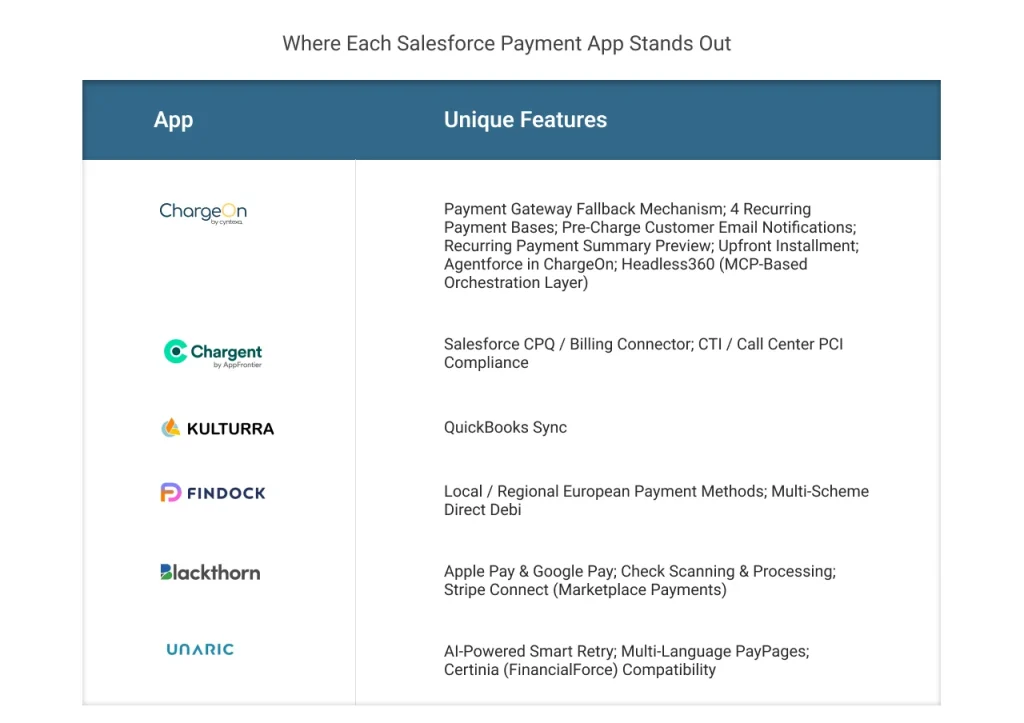
Beyond the core feature set every app shares, each one has capabilities the other five don’t offer. Here’s where each app genuinely leads.
Only in ChargeOn
- Payment Gateway Fallback Mechanism: Automatically reroutes a failed card payment to a backup gateway in real time, across up to 3 fallback gateways in priority order. No other app in this comparison switches payment gateways on failure.
- 4 Recurring Payment Bases: Count-based, Final Amount-based, End Date-based, and Subscription-based, four structurally distinct ways to set up a recurring cycle. Every other app offers frequency/interval selection only.
- Pre-Charge Customer Email Notifications: Alerts the customer before a scheduled or recurring charge is processed. Every other app notifies after the charge, not before.
- Recurring Payment Summary Preview: Shows a full schedule preview, total amount, frequency, and every charge date, before a recurring setup is confirmed.
- Upfront Installment: Charges an initial deposit immediately, then starts the recurring schedule only after that amount is collected.
- Agentforce in ChargeOn: Native Agentforce capabilities let agents collect payments, manage authorizations, process refunds, and run lookups directly through natural language prompts, built into the core ChargeOn platform itself.
- Headless360 (MCP-Based Orchestration Layer): An interface-agnostic architecture built on a custom MCP Server, exposing 12 Agentforce Actions for payments. A dedicated Confirmation Layer blocks any autonomous financial action from executing without explicit user approval. No other app in this comparison offers an MCP-based, client-agnostic orchestration layer, or a purpose-built safeguard against autonomous AI payment execution.
Only in Chargent
- Salesforce CPQ / Billing Connector: A dedicated connector with direct integration into Order Management and Revenue Cloud.
- CTI / Call Center PCI Compliance: Integrates with Five9 and Vonage to automatically pause call recordings when the Payment Console opens, and resume when it closes, making phone-based payment capture PCI-compliant.
Only in Kulturra
- QuickBooks Sync: A dedicated Salesforce-to-QuickBooks Online sync via Kulturra’s sister app, Apphesive. No other payment app in this comparison offers accounting system sync as part of its ecosystem.
Only in Blackthorn
- Apple Pay & Google Pay: Explicitly supported via Stripe integration.
- Check Scanning & Processing: Physical checks scanned and processed through Check 21 platform integration in the Salesforce mobile app.
- Stripe Connect (Marketplace Payments): Supports multi-party payment splits, useful for platforms and marketplaces distributing funds across multiple recipients.
Only in FinDock
- Local / Regional European Payment Methods: iDEAL, Bancontact, Sofort, Tikkie, MobilePay, and Swish, all supported natively.
- Multi-Scheme Direct Debit: SEPA, BACS, SEDA, CH-DD, and LSV+, the broadest direct debit scheme coverage in this comparison by a significant margin.
Only in Unaric Payments
- AI-Powered Smart Retry: Uses GoCardless Success+ to identify the statistically optimal time to retry a failed direct debit, toggleable per transaction.
- Multi-Language PayPages: Payment pages available in multiple languages out of the box, no custom translation setup required.
- Certinia (FinancialForce) Compatibility: a separate product, Unaric Payments for Certinia, built specifically for FinancialForce ERP users.
Features and differentiators matter, but they only count for as much as the budget allows. Pricing is where several of these apps diverge just as sharply as they do on functionality.
Salesforce Payment Solutions Pricing Compared
Pricing varies across Salesforce payment solutions. Some vendors publish a starting price, while others use licensing tiers, transaction-volume considerations, or custom quotations. The total cost can also depend on the number of users, supported payment gateways, transaction fees, add-ons, and implementation requirements.
The table below summarizes the available pricing information. Confirm all figures with the relevant vendor before making a purchasing decision.
| App | Starting Price | Pricing Model | Free Trial |
|---|---|---|---|
| ChargeOn | $4,500 USD/Org/year | Single Package, no per-transaction fee | 30-day free trial |
| Chargent | $8,004 USD/account/year (Startup) | Scales with usage; Enterprise priced on transaction volume | 30-day free trial |
| Kulturra | $900 USD/company/year (Starter, 5 licenses) | Scales by license count, plus per-license overage | Free trial available |
| FinDock | ~€625/month (~$8,878 USD/year) base | Base subscription + fixed fee per transaction (from €0.25/transaction) | Contact for details |
| Blackthorn | Contact for pricing | Not publicly disclosed | Contact for details |
| Unaric Payments | $8,100 USD/organization/year | Flat base price; transaction-fee savings advertised separately | Contact for details |
NOTE: Pricing is subject to change. We recommend verifying directly with each vendor before purchasing. We do not claim this is the final price for all these solutions; the data has been collected through the sources available on the web.
ChargeOn prices at a flat annual rate with no per-transaction fee. The cost stays the same whether transaction volume is low or high.
Chargent’s own pricing page confirms its plans are “billed annually, price scales with usage,” and its Enterprise tier is explicitly priced “based on transaction volume and unique business needs.”
Kulturra scales by license count rather than transaction volume. Each tier includes a set number of licenses, with additional licenses billed per seat, per month.
FinDock’s pricing is split into two parts: a base subscription, plus a fixed fee per transaction based on committed annual volume. Overuse beyond that commitment gets invoiced separately.
Blackthorn no longer publishes exact pricing figures; current plans require contacting sales directly for a quote.
Unaric Payments starts at a flat monthly base price, though its own marketing highlights reducing “transaction fees by up to 70%,” suggesting per-transaction costs factor into the overall spend.
Among these six, ChargeOn and Chargent’s Startup tier are the only options with a fixed, published starting price. But only ChargeOn keeps that price fixed regardless of transaction volume. Chargent, FinDock, and to some extent Unaric all incorporate usage or transaction count into how the final bill is calculated.
For a business processing high transaction volume, that difference compounds significantly over a year.
With features, differentiators, and pricing on the table, the remaining question is straightforward: which of these six actually fits your business?
Which Salesforce payment app is right for your business?
The right Salesforce payment solution depends on your payment methods, billing workflows, Salesforce architecture, regional requirements, and budget. Use the following guide to shortlist the options that match your priorities.
Choose ChargeOn if…
- You need to manage multiple supported payment gateways and want to evaluate configured gateway-fallback capabilities.
- You need instant, scheduled, or recurring payment workflows within Salesforce.
- You want to evaluate supported Agentforce payment actions and related automation.
- You need payment processing and orchestration alongside supported standard or custom Salesforce objects.
- You prefer a published annual subscription price, after confirming the current plan and any additional costs.
Choose Chargent if…
- Salesforce CPQ, Billing, or Revenue Cloud is already part of the tech stack.
- Phone-based payment teams need call recordings paused automatically during checkout, so agents stay PCI-compliant without manually managing compliance themselves.
- Call recordings should pause automatically during checkout. So phone-based agents stay PCI-compliant without managing compliance manually.
Choose Kulturra if…
- Invoicing is the core requirement, not just a secondary feature.
- Custom, complex Salesforce object structures need flexible mapping.
- QuickBooks Online sync is needed alongside Salesforce payment data.
- Licensing by seat count fits the business better than a flat platform fee.
Choose Blackthorn if…
- The business already runs on Stripe and wants deep native integration with it
- Apple Pay and Google Pay support matters as a named, explicit payment method.
- Physical check scanning and processing is part of the payment.
- Event registration, ticketing, or Field Service payment collection is a core use case.
Choose FinDock if…
- The business operates across Europe and needs native support for iDEAL, Bancontact, Sofort, or similar regional methods.
- The organization is a nonprofit needing deep Nonprofit Cloud or NPSP integration.
Choose Unaric Payments if…
- Multi-language payment pages are needed without custom translation work.

Conclusion: Choosing the Right Salesforce Payment Solution
The best Salesforce payment solution is the one that fits your organization’s payment methods, billing processes, Salesforce environment, and budget. Gateway count is only one consideration; the available payment methods, provider dependencies, recovery workflows, security responsibilities, and total cost also matter.
Kulturra may be worth evaluating for invoice-led collection, Chargent for object-level payments and billing-related workflows, Blackthorn for event or mobile use cases, FinDock for payment management and regional collection, and Unaric Payments for recurring collections and recovery workflows.
ChargeOn is worth evaluating if your priority is Salesforce-native payment processing with multi-gateway orchestration, scheduled and recurring payments, and supported Agentforce capabilities. Confirm the required gateways, workflow behavior, security requirements, and current pricing before making a decision.
Compare the products against your own requirements rather than relying on a single feature or headline gateway count. A structured evaluation will help you choose a solution that meets both your current payment needs and your longer-term Salesforce plans.