
Set Up an Installment Plan
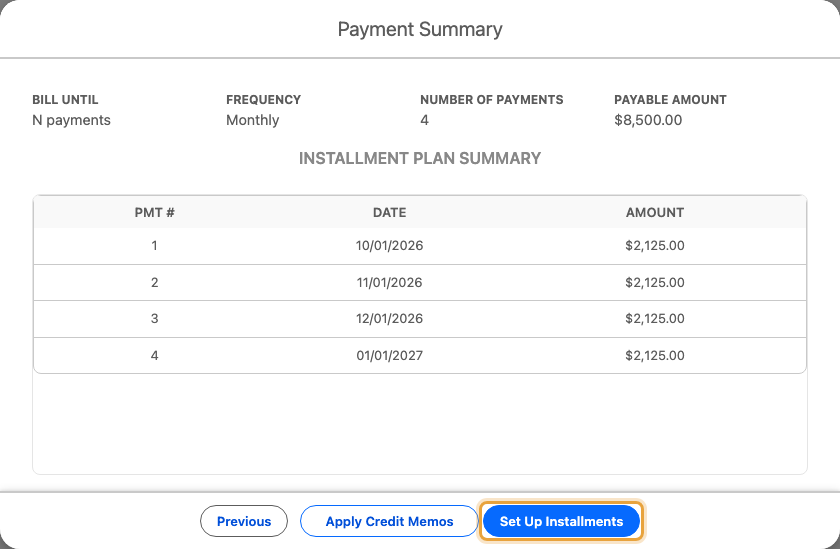
An installment plan splits an amount the customer already owes into equal payments, and stops by itself once the plan is satisfied. Use it when the total is known up front: an $8,500 invoice paid over four months at $2,125 per month.
If the billing should carry on indefinitely instead, you want a subscription.
The example splits Emily Ross’s $8,500 Q4 expansion for Summit Technologies into four monthly payments of $2,125.
Before You Start
- You need the Charge action on the record's page layout. See Part 6 of the quick start guide if it is missing.
- The gateway must support Installment billing under its Supported Payment Modes. See the gateway reference.
- You need either a saved payment method for the customer, or you plan to charge by Payment Link instead.
- Schedule the background jobs to process charges on their billing dates. See Part 7 of the quick start guide.
The 3 Ways an Installment Plan Ends
Under Bill until, you choose from 3 options. Each determines what you enter and what ChargeOn works out for you:
| Bill until | You enter | ChargeOn works out |
|---|---|---|
| N payments | Number of Payments (between 2 and 600) | The amount of each payment |
| Total reached | Per-Installment Amount | How many payments it takes to reach the total |
| End date | End Date | The amount of each payment, spread evenly until that date |
For all 3 options, the total comes from the Payable Amount already on the charge screen. You never enter the total twice.
Steps
- Open the record and click Charge.
-
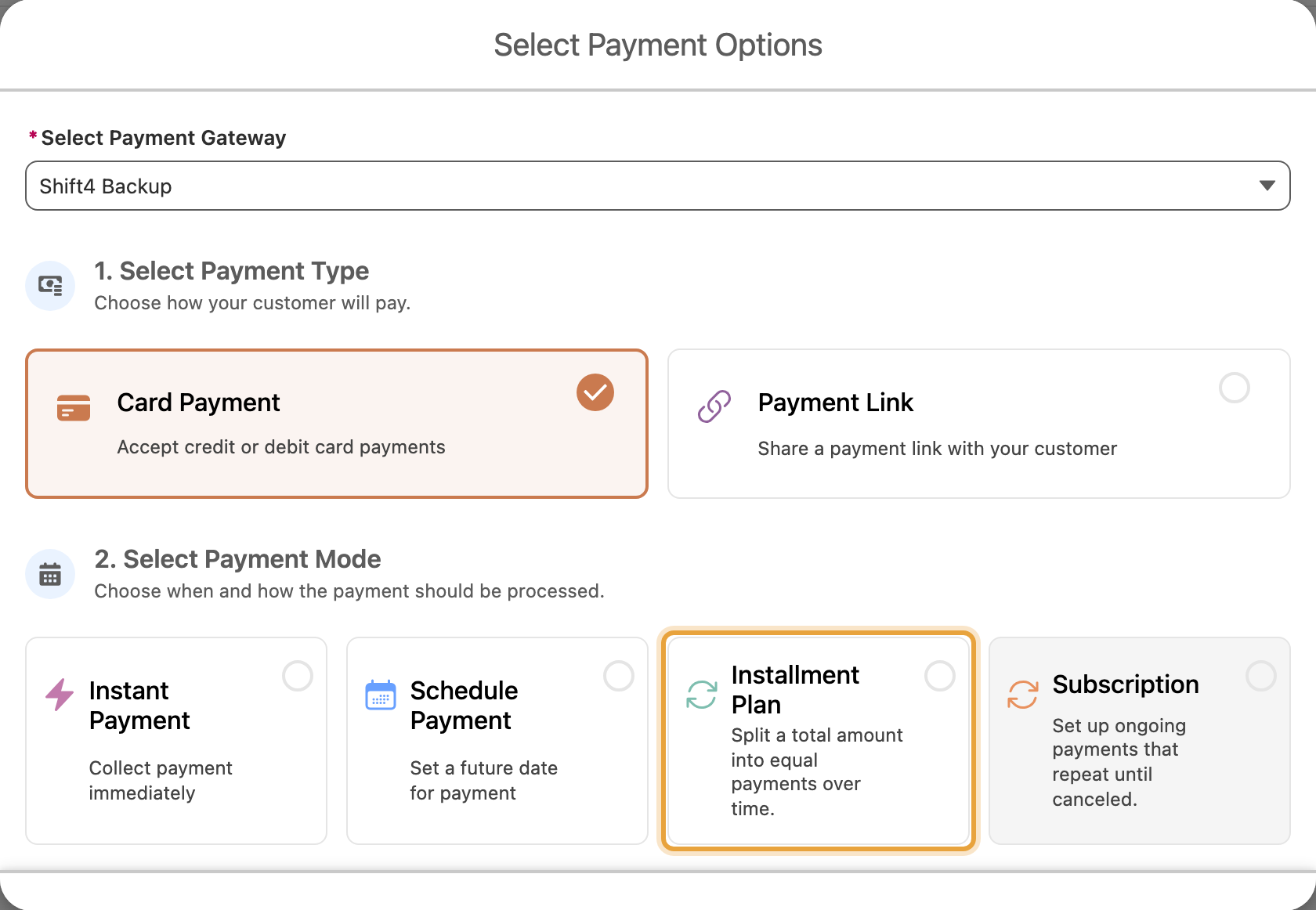
Choose Card, ACH, or Payment Link as the payment type.
-
Choose Installment Plan.
-
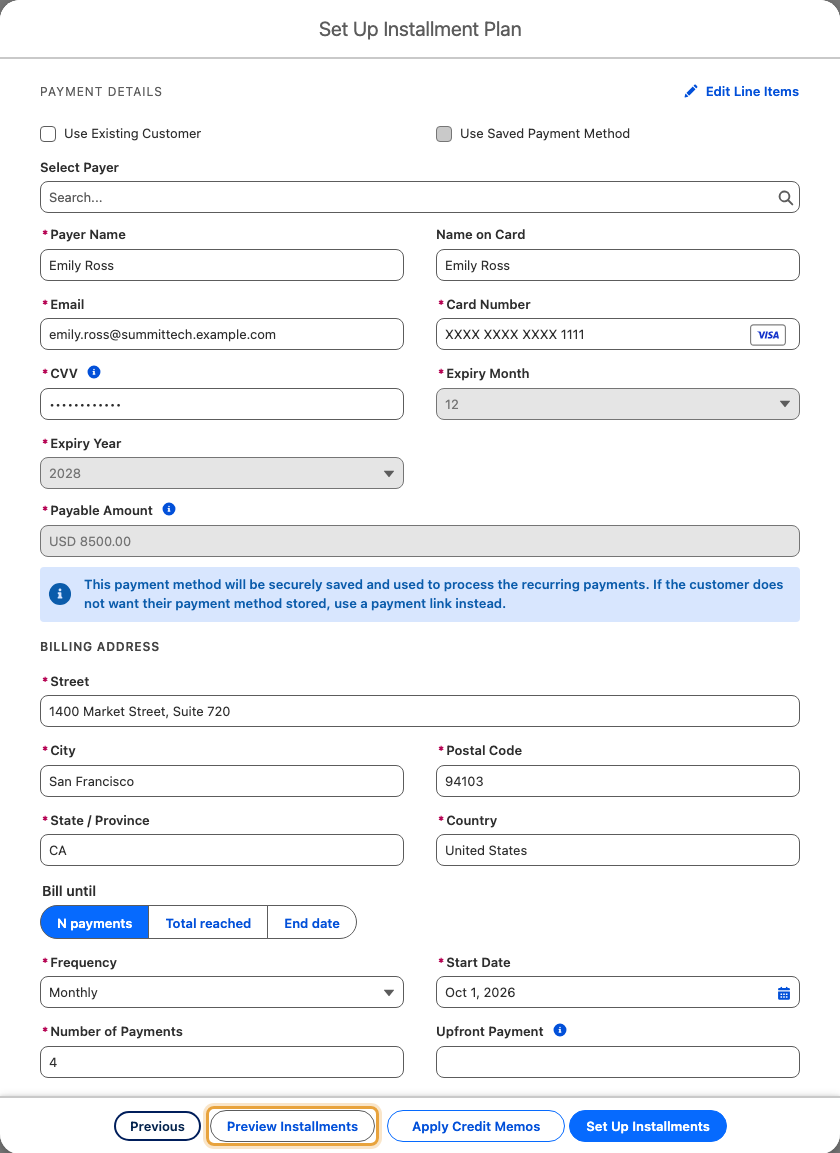
Under Bill until, choose N payments, Total reached, or End date.
-
Choose a Frequency: weekly, fortnightly (labelled Biweekly on screen), monthly, quarterly, half-yearly or yearly.
-
Set the Start Date, and fill in the field that matches your choice at step 4: Number of Payments, Per-Installment Amount, or End Date.
-
Optional: enter an amount under Upfront Payment to charge something today, before the regular cycle begins.
-
Click Preview Installments.
-
Check the preview: it lists every charge by number, date and amount before you confirm anything.
-
Click Set Up Installments to confirm.
What You Should See
A new record showing the Bill until choice, frequency and next payment date you set. If you set an upfront payment, or a start date of today, the first charge processes immediately.
If you chose Payment Link instead of a saved payment method, no charge happens yet. ChargeOn emails the customer a link for the first amount due, and the plan waits for them to pay it.
The preview matches what runs
The dates, amounts and sequence shown before you confirm are exactly what gets scheduled. They are computed by the same logic that runs the plan, not a separate estimate.
If It Does Not Work
| Symptom | Likely cause | What to do |
|---|---|---|
| Installment Plan does not appear as an option | The selected gateway is not configured to support that mode | Check its Supported Payment Modes in the gateway reference |
| The plan was created, but no charge has ever happened | The background jobs are not scheduled | Part 7 of the quick start guide |
| A charge came from a gateway you did not expect | The first charge failed over to a fallback gateway, and the plan is now permanently pinned to it | This is expected behaviour. See the warning in Installments and subscriptions |
| The plan stopped early, with charges left unmade | Each genuine decline uses up one of the fixed number of charges, the same as a success | Check the plan's history for the declined cycle, and fix the payment method going forward |